Key takeaways
- For a home that wants a four-bay network drive for backups, photos and shared files, the Synology DS423 suits buyers who value polished software and…
For a home that wants a four-bay network drive for backups, photos and shared files, the Synology DS423 suits buyers who value polished software and simple file serving, the Asustor Drivestor 4 Pro Gen2 suits buyers who want a 2.5GbE port at the budget end, and the TerraMaster F4-424 or UGREEN NASync DXP4800 suit buyers who want an x86 chip and media transcoding but will likely spend above a cap like “under $300”. An honest note up front: the cap is tight for a four-bay enclosure, and drives are sold separately, so total cost is always higher than the box alone. This guide covers what each model offers and where it falls short.
Our top picks


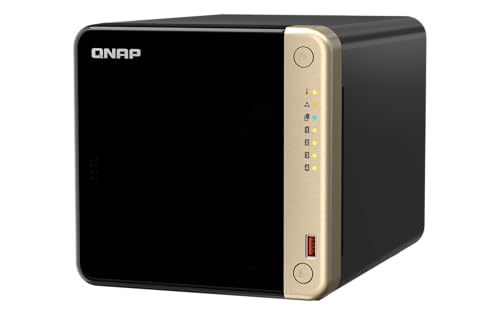
As an Amazon Associate we earn from qualifying purchases at no extra cost to you.
Quick answer by buyer type
- File backup, photo library, shared folders, minimal fuss: Synology DS423 (ARM chip, 2 GB RAM, two 1GbE ports).
- Budget NAS with a faster network port: Asustor Drivestor 4 Pro Gen2, which has one 2.5GbE port.
- Plex, Docker, 4K transcoding, NVMe caching: TerraMaster F4-424 or UGREEN DXP4800, both Intel based with two M.2 slots, in a higher price tier.
- Heavier use and more RAM headroom: step up to the TerraMaster F4-424 Pro or UGREEN DXP4800 Pro, clearly beyond this budget.
What the cap means in practice
A diskless four-bay NAS in the budget class is almost always built on a modest ARM processor. The more capable x86 models with Intel chips and multiple network ports usually sit above the cap, though sales vary. Buyers should also plan for the cost of four hard drives, since a NAS enclosure ships empty. If the full budget must cover drives, a two-bay or one-bay NAS is often the better plan; the models in this class include the Synology DS124 (one bay) and DS223j (two bays).
At a glance
| Model | CPU and RAM | Network | Other stated specs | Limits |
|---|---|---|---|---|
| Synology DS423 | Realtek RTD1619B quad-core, up to 1.7 GHz; 2 GB DDR4 | 2 x 1GbE | 4 SATA bays, SHR, RAID 0/1/5/6/10, 2 x USB 3.2 Gen 1, up to 72 TB listed | ARM chip: no Container Manager, VMs or hardware transcoding per reviewers; gigabit tops out near 110 MB/s |
| Asustor Drivestor 4 Pro Gen2 (AS3304T V2) | Realtek RTD1619B 1.7 GHz quad-core; 2 GB DDR4, not expandable | 1 x 2.5GbE | Listed 283 MB/s read, 280 MB/s write; 4K H.265 transcoding; Btrfs snapshots; 3 x USB 3.2 Gen 1 | One network port, fixed RAM |
| TerraMaster F4-424 | Intel N95 quad-core; 8 GB DDR5 (one slot, up to 32 GB) | 2 x 2.5GbE | 2 x M.2 NVMe, HDMI 2.1, hardware transcoding, hot-swap trays | Typically above the cap |
| UGREEN NASync DXP4800 | Intel N100 quad-core; 8 GB DDR5 | 2 x 2.5GbE | 4 bays, 2 x M.2, HDMI; capacity figures differ by listing | Typically above the cap; newer software platform |
Synology DS423: the software-first pick
The DS423 is Synology’s value four-bay. It uses a Realtek RTD1619B ARM chip with 2 GB of non-ECC DDR4, four 3.5 or 2.5 inch SATA bays and two Gigabit Ethernet ports. RAID options include Synology Hybrid RAID, Basic, JBOD, and RAID 0, 1, 5, 6 and 10. Capacity is listed at up to 72 TB of data, with a maximum single volume of 108 TB. It has two 80 mm fans, measures 184 x 168 x 230 mm and weighs 2.21 kg.
The trade-off is the processor. Because it is an ARM chip, reviewers note there is no Container Manager, no virtual machines and no hardware transcoding. It handles file serving, backups, photo management and basic sync well, but it is not the right machine for running Plex with 4K transcodes or Docker stacks. Soft limits also apply to concurrent SMB connections and VPN sessions on some entry models, and the gigabit ports mean real file speeds around 110 MB/s. The maker’s datasheet lists hot-swappable drives for the DS423, though buyers should still follow the manual for the correct procedure.
Do not confuse it with the DS423+, which is a different model with an Intel Celeron processor and which one retailer lists as end of life.
Asustor Drivestor 4 Pro Gen2: faster port, same class of chip
The Gen2 (model AS3304T V2) uses the same class of 1.7 GHz Realtek RTD1619B quad-core chip, with 2 GB of DDR4 that cannot be expanded. Its main advantage is a single 2.5GbE port, plus the maker’s listed read and write speeds of up to 283 and 280 MB/s. It adds 4K H.265 hardware transcoding and Btrfs snapshots. Four hot-swappable bays are listed, and the original AS3304T listed three USB 3.2 Gen 1 ports and expansion to 16 bays with expansion units. Dimensions for the original are 170 x 174 x 230 mm with a 90 W adapter and a three-year warranty. Note that the original (v1) uses a slower 1.4 GHz chip, so the “V2” or “Gen2” label matters when comparing listings.
A 2.5GbE port only helps if the router, switch or computer also supports 2.5G; otherwise the link falls back to 1G.
TerraMaster F4-424 and UGREEN DXP4800: more power, higher tier
The TerraMaster F4-424 uses an Intel N95 quad-core processor with up to 3.4 GHz turbo, 8 GB of DDR5 with one slot up to 32 GB, four hot-swap SATA bays (the maker lists up to 88 TB raw, which can change as larger drives are released), two M.2 2280 NVMe slots for caching, dual 2.5GbE with link aggregation to 5 Gb, one HDMI 2.1 port and hardware transcoding for H.264 and H.265 up to 4K at 60 fps. It draws about 33 W under read and write load and 13 W in hibernation, according to the maker. The F4-424 Pro swaps in a Core i3-N305 and 32 GB of RAM.
The UGREEN NASync DXP4800 uses an Intel N100, 8 GB DDR5, four bays and two M.2 slots, with two 2.5GbE ports that can be aggregated to 5G. The base model has one memory slot, so adding RAM means replacing the factory module; listings differ on the maximum (16 GB is the commonly cited rating, and some sources mention 32 GB modules working). The line also includes higher variants such as the DXP4800 Plus and DXP4800 Pro with different processors and memory limits. Buyers should compare the exact variant name carefully, since the line has several models with different CPUs and network ports.
Drives, RAID and care notes
- Use NAS-rated drives. Drives meant for 24-hour operation handle vibration and heat better than ordinary desktop drives. Check the maker’s compatibility list for the model.
- Avoid mixing recording types blindly. Some drives at the same capacity use shingled recording, which can slow rebuilds. Check the drive datasheet.
- RAID is not backup. RAID 5 or SHR survives one drive failure, but it does not protect against deletion, ransomware or fire. Keep a separate copy.
- Cooling and placement: allow space around the fans and keep the unit off carpets.
- Power: use a surge protector or a UPS if the area has unstable power, following the maker’s manual.
Capacity planning
Usable space depends on the RAID type. Four equal drives in RAID 5 or Synology Hybrid RAID give roughly three drives of space, with one drive of protection, while RAID 10 gives about half. Start with the total data you hold now, double it for growth, and then pick the drive size accordingly. Buying two larger drives first and adding more later works with Synology Hybrid RAID on its models, which is one of the software’s selling points.
Pick X if…
| Pick this | If you… |
|---|---|
| Synology DS423 | want mature software for backups and photos and do not need containers or transcoding |
| Asustor Drivestor 4 Pro Gen2 | want a 2.5GbE port and light 4K H.265 transcoding at a budget tier |
| TerraMaster F4-424 | want an Intel chip, two NVMe slots and HDMI, and can exceed the cap |
| UGREEN DXP4800 | want an Intel chip with a newer interface and can exceed the cap |
Alternatives
A two-bay unit such as the Synology DS223j or the UGREEN DXP2800 leaves more of the budget for drives. Buyers who only need an external backup target can use a USB desktop hard drive and skip the NAS entirely, at the cost of network sharing.
Frequently Asked Questions
Can I really get a 4-bay NAS under $300?
Entry-level ARM models such as the Synology DS423 are the usual candidates, but pricing moves and some sit above that cap. Drives are extra, so the finished system costs more than the enclosure.
Is an ARM NAS good enough for Plex?
For direct playback of files the client can decode, often yes. Transcoding is the weak spot: reviewers report the DS423 has no hardware transcoding, while the Asustor Gen2 lists 4K H.265 hardware transcoding and the Intel-based models list more capable options.
Do I need 2.5GbE?
Only if your other equipment supports it. With a Gigabit router and no 2.5G switch, the extra port speed goes unused, though link aggregation on dual-port models can help multiple users.
Which RAID level should I use?
RAID 5 or Synology Hybrid RAID balances space and protection with four drives. RAID 10 gives faster rebuilds at the cost of capacity. None of them replace a separate backup.
Can I add more RAM later?
It depends on the model. The Asustor Gen2 states fixed 2 GB, while the TerraMaster F4-424 lists one slot up to 32 GB and the UGREEN base model has one slot with a commonly cited 16 GB rating. Check the maker’s guide for supported modules.
How much power does a 4-bay NAS use?
TerraMaster lists about 33 W during read and write and 13 W in hibernation for the F4-424. Actual draw depends on the drives installed.