Our Short List of 3

- Best for: Cameras with UHS-II slots shooting high-bitrate 4K or 8K video, and photographers who fire long continuous RAW bursts and want the buffer back immediately.
- 128GB SDXC, UHS-II bus, C10 / U3 / V90 speed classes, read speeds up to 300 MB/s, write speeds up to 260 MB/s, rated by the listing for 8K, 4K and Full HD video recording, shockproof, temperature-proof, waterproof and X-ray-proof construction.

- Best for: Shooters with dual-slot cameras who want a matched pair for instant backup or overflow recording, and anyone who likes a formatted spare already in the bag.
- Two 128GB SDXC cards in the pack, UHS-II bus, C10 / U3 / V60 speed classes, read speeds up to 250 MB/s, rated for Full HD and 4K recording, backward compatible with UHS-I devices at UHS-I speeds and with older devices at Class 10 speeds.
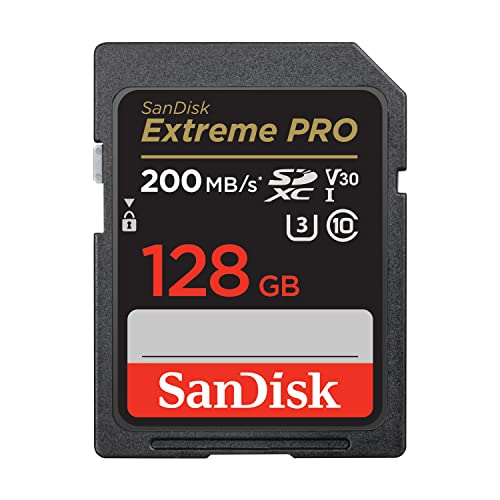
- Best for: The large installed base of UHS-I cameras — older mirrorless bodies, DSLRs and compacts — shooting 4K video and fast stills sequences without paying for a UHS-II bus the camera cannot use.
- 128GB SDXC, UHS-I bus, C10 / U3 / V30 speed classes, read speeds up to 200 MB/s with SanDisk QuickFlow technology, write speeds up to 90 MB/s, shot speeds up to 140 MB/s for burst shooting, rated for 4K UHD video, built to resist temperature, water, shock, humidity, wear, drops, X-rays and magnets.
All 3 Picks at a Glance
| Product | Specs | Action |
|---|---|---|
| SanDisk Extreme PRO SDXC UHS-II 128GB (V90) |
| Check price on Amazon |
| Lexar Professional 1667x SDXC UHS-II 128GB 2-Pack (V60) |
| Check price on Amazon |
| SanDisk Extreme PRO SDXC UHS-I 128GB (V30) |
| Check price on Amazon |
Key takeaways
- Full-size SDXC cards for recording photos and videos compared: UHS-II V90 and V60 picks plus a UHS-I V30 card, with speed classes and burst-shooting advice.
A memory card has one job when you are recording photos and videos: keep up with the camera. If the card cannot sustain the write speed your camera demands, bursts stall, video clips stop early, and high-bitrate modes refuse to start. This guide compares three full-size SDXC cards — we stick to one consistent card type throughout, because full-size SD is what most mirrorless and DSLR cameras use for serious photo and video work.
Our top pick is the SanDisk Extreme PRO SDXC UHS-II 128GB (V90), the fastest card here for sustained writing. The runner-up is the Lexar Professional 1667x SDXC UHS-II 128GB 2-Pack (V60), which pairs UHS-II speed with a second card in the box. The SanDisk Extreme PRO SDXC UHS-I 128GB (V30) covers cameras with a single UHS-I slot.
All three cards are 128GB, which is a deliberate choice: it is large enough for a long wedding, match or travel day of mixed stills and 4K footage, small enough that losing one card does not mean losing a week of work, and it is the capacity at which the manufacturers’ speed figures in the listings are quoted. Every specification below — bus type, speed classes, read and write figures, durability claims — is taken from that card’s own listing, and each card was confirmed as currently sold on Amazon US before inclusion. If your camera takes microSD only, none of these is your card; adapters exist, but a full-size card in its native slot is always the more reliable recording medium.
Quick Picks
As an Amazon Associate we earn from qualifying purchases.
| Product | Best for | ASIN |
|---|---|---|
| SanDisk Extreme PRO SDXC UHS-II 128GB V90 | High-bitrate video and long RAW bursts | B08YF7PB14 |
| Lexar Professional 1667x SDXC UHS-II 128GB 2-Pack V60 | Two-slot cameras and backup card in the bag | B07RCN2BFM |
| SanDisk Extreme PRO SDXC UHS-I 128GB V30 | UHS-I cameras shooting 4K and stills | B09X7FXHVJ |
How to Choose
Read the Video Speed Class first
The V class is the number that matters for recording video, because it states a minimum sustained write speed: V30 guarantees at least 30 MB/s of continuous writing, V60 doubles that, and V90 triples it. Peak write figures in a headline only describe short bursts under ideal conditions. Match the V class to your camera’s most demanding mode — high-frame-rate 4K and all-intra codecs need V60 or V90 headroom, while standard 4K recording sits comfortably on V30.
Match the bus to your camera’s slot
UHS-II cards carry a second row of contacts and only reach their full speed in a UHS-II slot. In a UHS-I camera they still work, but they fall back to UHS-I speeds. Check your camera’s manual for the slot type before paying for UHS-II performance you cannot use, and remember that a UHS-II reader is also needed to see the fastest transfers to a computer.
Separate burst needs from video needs
Still photographers shooting long RAW bursts care about how fast the card clears the camera buffer, which tracks the card’s maximum write speed. Videographers care about the sustained floor. A card can be excellent at one and merely adequate at the other, so decide which failure you are actually trying to avoid: a stalled burst during a once-only moment, or a dropped recording mid-clip.
Buy capacity for your longest session
Video consumes capacity far faster than stills, and a card that fills up mid-event is worse than a slightly slower one. Work out how much footage your longest typical session produces, then buy at least one step above that. Two cards also beat one for field work: when the first fills, you swap and keep recording instead of offloading on location. Remember too that headline capacities are measured in decimal gigabytes, so a 128GB card shows as somewhat less in camera — normal behaviour, not a fault, and another reason to leave headroom rather than planning to use every last megabyte of a card during a recording session.
The 3 Best SDXC Cards for Recording Photos and Videos
SanDisk Extreme PRO SDXC UHS-II 128GB (V90)
- Best for: Cameras with UHS-II slots shooting high-bitrate 4K or 8K video, and photographers who fire long continuous RAW bursts and want the buffer back immediately.
- 128GB SDXC, UHS-II bus, C10 / U3 / V90 speed classes, read speeds up to 300 MB/s, write speeds up to 260 MB/s, rated by the listing for 8K, 4K and Full HD video recording, shockproof, temperature-proof, waterproof and X-ray-proof construction.
Cameras with UHS-II slots shooting high-bitrate 4K or 8K video, and photographers who fire long continuous RAW bursts and want the buffer back immediately.
The headline speeds need UHS-II hardware on both ends — the listing notes a UHS-II reader (sold separately) is required for the fastest transfers, and in a UHS-I camera this card performs like a UHS-I card.
Watch out for: The headline speeds need UHS-II hardware on both ends — the listing notes a UHS-II reader (sold separately) is required for the fastest transfers, and in a UHS-I camera this card performs like a UHS-I card.
Lexar Professional 1667x SDXC UHS-II 128GB 2-Pack (V60)
- Best for: Shooters with dual-slot cameras who want a matched pair for instant backup or overflow recording, and anyone who likes a formatted spare already in the bag.
- Two 128GB SDXC cards in the pack, UHS-II bus, C10 / U3 / V60 speed classes, read speeds up to 250 MB/s, rated for Full HD and 4K recording, backward compatible with UHS-I devices at UHS-I speeds and with older devices at Class 10 speeds.
Shooters with dual-slot cameras who want a matched pair for instant backup or overflow recording, and anyone who likes a formatted spare already in the bag.
Lexar’s own listing states that write speeds are lower than the 250 MB/s read figure without quoting a separate peak write number, so judge this card by its V60 sustained floor rather than expecting it to clear buffers like the V90 card above.
Watch out for: Lexar’s own listing states that write speeds are lower than the 250 MB/s read figure without quoting a separate peak write number, so judge this card by its V60 sustained floor rather than expecting it to clear buffers like the V90 card above.
SanDisk Extreme PRO SDXC UHS-I 128GB (V30)
- Best for: The large installed base of UHS-I cameras — older mirrorless bodies, DSLRs and compacts — shooting 4K video and fast stills sequences without paying for a UHS-II bus the camera cannot use.
- 128GB SDXC, UHS-I bus, C10 / U3 / V30 speed classes, read speeds up to 200 MB/s with SanDisk QuickFlow technology, write speeds up to 90 MB/s, shot speeds up to 140 MB/s for burst shooting, rated for 4K UHD video, built to resist temperature, water, shock, humidity, wear, drops, X-rays and magnets.
The large installed base of UHS-I cameras — older mirrorless bodies, DSLRs and compacts — shooting 4K video and fast stills sequences without paying for a UHS-II bus the camera cannot use.
V30 is a floor, not headroom: the most demanding high-bitrate and high-frame-rate video modes on newer cameras ask for V60 or V90, and this card’s 200 MB/s read figure needs a QuickFlow-compatible reader to materialise.
Watch out for: V30 is a floor, not headroom: the most demanding high-bitrate and high-frame-rate video modes on newer cameras ask for V60 or V90, and this card’s 200 MB/s read figure needs a QuickFlow-compatible reader to materialise.
Which One Fits Your Situation
If your camera has a UHS-II slot and you record high-bitrate video or shoot sports and wildlife bursts, the SanDisk Extreme PRO UHS-II V90 is the card that removes the card from the list of things that can go wrong. If you run a two-slot body and record to both cards at once, or simply lose cards often enough that a spare matters, the Lexar 1667x two-pack gives you V60 sustained speed twice in one purchase. If your camera is UHS-I only — still the majority of bodies in daily use — the SanDisk Extreme PRO UHS-I V30 is the honest match: fast where your camera can use it, durable, and not held back by a bus your slot does not have.
Common Mistakes
- Buying on read speed alone. Read speed governs offloading to a computer. Recording is governed by sustained write speed, which is what the V class certifies.
- Ignoring the slot. A UHS-II card in a UHS-I camera is a UHS-I card. Check the manual before spending on the faster bus.
- Formatting in the computer only. Cards formatted in a computer can carry a file structure the camera tolerates but does not love. Format in the camera you will shoot with.
- Running one card until it dies. Cards are consumables. Rotating two or three cards spreads wear and means a failure costs you a card, not a shoot.
- Filling a card completely. Leave headroom at the end of a session; a card at absolute capacity during a long clip is where recording errors like to live.
- Mixing card speeds in a dual-slot backup setup. When a camera writes to both slots simultaneously, the pair runs at the slower card’s pace. Matched cards — exactly what the Lexar two-pack provides — keep backup recording from quietly throttling your bursts.
- Judging a card by its first week. Flash memory that is going to fail usually does so early or after heavy use. Put new cards through a full practice session, including a complete fill and offload, before trusting one to an event you cannot repeat.
Safety & Care Notes
Back up every card the same day you shoot, to two separate places, before you format it for reuse. Keep cards in their plastic cases rather than loose in a pocket or bag, where contacts collect grit and lint. Avoid swapping cards in rain, dust or beach wind when you can step into shelter for ten seconds instead. If a card ever reports an error, stop shooting on it immediately — continued writing can overwrite the very files you are hoping to recover. Finally, buy from reputable listings: counterfeit capacity cards are a long-standing problem in this category, and a card that reports more space than it physically has will corrupt data silently once the real capacity is passed.
FAQ
Is V30 fast enough for 4K video recording?
For most cameras’ standard 4K modes, yes — V30 certifies a sustained 30 MB/s write floor, which covers the bitrates of typical 4K recording. Cameras offering high-frame-rate 4K, all-intra codecs or 8K modes may require V60 or V90, and some will warn you or refuse the mode on a slower card. Your camera manual lists the required class for each mode.
Will a UHS-II card work in my UHS-I camera?
Yes. UHS-II cards are backward compatible and run at UHS-I speeds in a UHS-I slot. You lose the speed advantage but keep the capacity and the V-class behaviour the card can deliver over the older bus. The reverse is also true: a UHS-I card works in a UHS-II slot, again at UHS-I speeds.
Why does my burst stop even though the card is fast?
The camera’s internal buffer fills first and drains to the card at the card’s write speed. A faster sustained write clears the buffer sooner, which is why the V90 card keeps bursts going longer than the V30. Burst depth also depends on file size — RAW files fill and drain the buffer far faster than JPEGs on any card.
Should I choose one large card or two smaller ones?
For recording photos and videos in the field, two cards usually win: you can swap at a natural break, record to both slots for instant backup, and a single card failure never takes the whole day with it. One large card suits long unattended video recording where a swap mid-session is impossible.