Key takeaways
- For a household that needs a wired link to a far room without running cable, a two-port passthrough kit such as the TP-Link TL-PA9020P KIT or the NETGEAR…
For a household that needs a wired link to a far room without running cable, a two-port passthrough kit such as the TP-Link TL-PA9020P KIT or the NETGEAR PLP2000 suits buyers who want the fastest rated option, while the NETGEAR PL1000 suits buyers who only need a basic single-port link for a TV or console. Powerline adapters send data through the home’s electrical wiring, so results depend on the wiring far more than on the label speed. This guide explains the models, what the stated numbers mean, and how to decide whether powerline is the right tool at all.
Our top picks


As an Amazon Associate we earn from qualifying purchases at no extra cost to you.
Quick answer by buyer type
- Streaming box, console or smart TV in a distant room: a single-port kit like the NETGEAR PL1000 is usually enough.
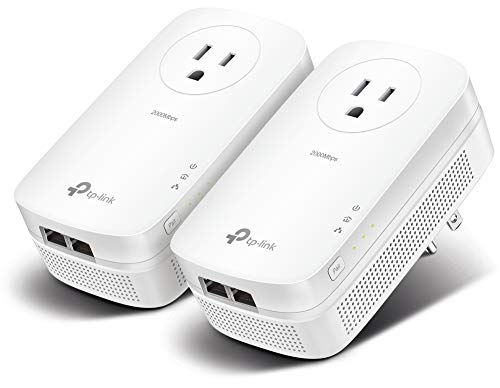
- Two wired devices at the far end (TV plus console, or PC plus printer): a kit with two Gigabit ports per adapter, such as the TP-Link TL-PA9020P KIT or NETGEAR PLP2000.
- A crowded outlet: choose a passthrough model, which has a pass-through power socket so you do not lose the wall outlet.
- Old or heavily mixed wiring, or a very large home: consider a mesh Wi-Fi system or running Ethernet cable instead.
How powerline speeds should be read
The big numbers on the box, such as “AV2000” or “2000 Mbps”, describe the theoretical physical-layer rate on the electrical line. They are not the speed you will see at a laptop or console. TP-Link states that real-world speeds are lower and vary with wiring quality and circuit layout. NETGEAR gives a more specific expectation for the PLP2000, which lists real throughput of over 500 Mbps depending on home wiring, though independent reviewers have measured much lower figures in ordinary homes. Many homes still get enough for 4K streaming, video calls and most gaming, but results are normally well below a direct Ethernet cable.
Powerline works best when both adapters are on the same electrical circuit or at least the same electrical panel. Adapters on different phases, on circuits separated by long runs, or behind other equipment with electrical noise can drop speeds noticeably. Plug adapters directly into a wall outlet, not into a power strip or surge protector, unless the maker’s manual says otherwise, because filtering in strips can block the signal.
At a glance
| Model | Rated speed | Ethernet ports per adapter | Pass-through outlet | Other stated specs |
|---|---|---|---|---|
| TP-Link TL-PA9020P KIT | AV2000 (up to 2000 Mbps on the line) | 2 x Gigabit | Yes | HomePlug AV2, IEEE 1901, 2×2 MIMO with beamforming, 128-bit AES, 5.8 W max, 0.5 W standby |
| NETGEAR PLP2000 | 2000 Mbps, HomePlug AV2 | 2 x Gigabit | Yes, noise filtered | Real throughput stated over 500 Mbps, 6.5 W normal, under 0.5 W in power saving, 133.5 x 72 x 37.8 mm |
| NETGEAR PL1000 (v2) | 1000 Mbps | 1 x Gigabit | None listed | Rated figure is a line rate; actual throughput varies with wiring; under 3.73 W normal, 100 x 59 x 35.9 mm |
TP-Link TL-PA9020P KIT
The kit includes two adapters and two 2-meter Ethernet cables. Each adapter has two Gigabit Ethernet ports and an integrated power passthrough socket, so a TV and a console can both plug into the far adapter. The maker lists HomePlug AV2, HomePlug AV, IEEE 1901, 2×2 MIMO with beamforming, 128-bit AES encryption and a pair button for setup. It lists maximum consumption of 5.8 W and 0.5 W in standby, with a power saving mode that cuts consumption by up to 85 percent.
Compatibility is a useful point. The maker states that it works with AV2000, AV1200, AV1000, AV600, AV500 and AV200 adapters, which lets buyers expand an older setup. The maker’s datasheet states a range of up to 300 meters over household wiring, and other listings quote different figures; since the electrical path is what counts, these numbers should be treated as marketing maxima rather than guarantees. Plug types vary by region, so buyers outside North America should pick the matching plug version. Dimensions are about 2.8 x 1.7 x 5.2 inches.
NETGEAR PLP2000
The PLP2000 is the direct competitor, with two Gigabit ports per adapter and a noise-filtered pass-through outlet. NETGEAR lists 2000 Mbps AV2 compliance, IEEE 1901 and 802.3 support, 128-bit AES encryption and a 2 to 86 MHz band. The maker’s stated typical coverage of up to 500 square meters is a marketing maximum, not a guarantee for any particular home. Operating temperature is listed as 0 to 40 degrees Celsius.
It is the physically larger of the units, at about 133.5 x 72 x 37.8 mm, and weight is listed as 226 g on the product page, with the manual giving slightly higher figures by region. The noise-filtered outlet is worth noting: a pass-through socket that filters electrical noise can protect the adapter’s signal when a noisy device such as a phone charger or space heater is plugged into it. Buyers should still follow NETGEAR’s manual on what loads the pass-through supports.
NETGEAR PL1000
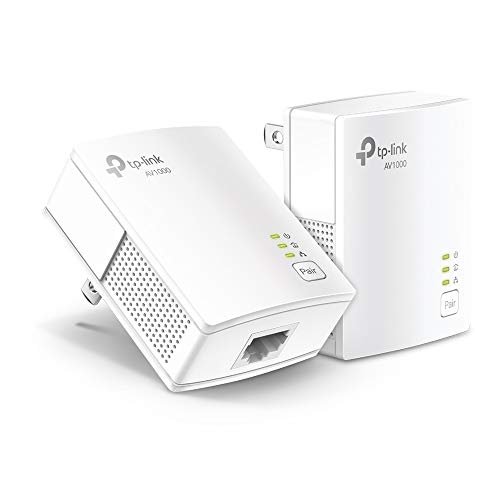
The PL1000 is a basic kit: two adapters, each with one Gigabit Ethernet port, plus two 2-meter cables. It is smaller and lighter (about 126 g each) and uses under 3.73 W in normal operation. It works with HomePlug AV and Green PHY adapters. There is no pass-through socket listed, so it occupies a wall outlet. For a single smart TV or console it is a reasonable budget pick, but its lower rated speed matters if several devices share the link.
Fit, safety and setup notes
- Plug directly into the wall. Power strips, surge protectors and extension leads can weaken the signal. Follow the maker’s manual.
- Do not overload the pass-through outlet. Respect the maximum load printed on the adapter or in the manual. Do not plug in space heaters, kettles or other high-power appliances unless the manual says it is allowed.
- Electrical work: adapters are plug-in devices and need no wiring. If outlets are loose, discolored or warm, have a licensed electrician inspect the wiring instead of troubleshooting with adapters.
- Security: use the pair button to create an encrypted network. Both makers state 128-bit AES.
- Mixed generations: older adapters can usually join the same network, but speed will drop to the older standard’s capability.
- Noise sources: laundry equipment, dimmers, LED drivers and some chargers add electrical noise. Try a different outlet if speeds are poor.
Setup and troubleshooting basics
Setup is usually a matter of plugging in both adapters, waiting for the powerline light to turn solid, and pressing the pair button on each adapter within the time window the manual gives. After pairing, connect the first adapter to the router with the supplied Ethernet cable, and the second to the device. If the powerline light stays red or amber, move the far adapter to another outlet in the same room, or try an outlet on a different wall. If speeds are poor, unplug nearby noisy devices such as chargers, LED dimmers and old power supplies, since the makers note that wiring quality and electrical interference affect results. Firmware and utility apps from the maker can show the link rate between adapters, which helps judge whether a different outlet makes a difference.
Powerline is also not meant to be chained through extension reels. If a kit stops working after a storm or power surge, check the maker’s reset instructions before replacing it, and consider unplugging adapters during severe weather.
Pick X if…
| Pick this | If you… |
|---|---|
| TP-Link TL-PA9020P KIT | want two Gigabit ports at the far end, a pass-through socket and compatibility with many older AV generations |
| NETGEAR PLP2000 | want a noise-filtered pass-through outlet and a maker-stated throughput figure |
| NETGEAR PL1000 | need a simple, smaller kit for one device and have modest speed needs |
| Mesh Wi-Fi or a cable run | have unreliable wiring, or need the most consistent speed |
Alternatives
Where powerline is unreliable, a mesh Wi-Fi kit with a wired backhaul port, or a MoCA adapter pair if the home has coaxial cable in the walls, can give steadier results. A long flat Ethernet cable along a baseboard is the cheapest and most dependable option when the route is short. Powerline remains attractive for rented homes and for rooms where neither cable nor strong Wi-Fi is practical.
Frequently Asked Questions
Does powerline work through any electrical outlet?
It generally needs outlets on the same home electrical system, and works best on the same circuit. Different circuits, sub-panels or older wiring can reduce speed or stop the link, and no adapter maker guarantees performance in every home.
Why is my speed much lower than the 2000 Mbps on the box?
That number is the physical line rate, not a data speed. NETGEAR states over 500 Mbps real throughput for its PLP2000 under suitable conditions, TP-Link says real speeds vary with wiring and circuit layout, and independent reviewers often measure well below the maker figures.
Can I use a power strip with a powerline adapter?
Plugging the adapter directly into a wall outlet is the standard guidance, since power strips with surge or noise filtering can weaken the signal. Check the maker’s manual for the exact rule.
Can I mix different brands of adapters?
Adapters that follow HomePlug AV or IEEE 1901 are designed to interoperate, but pairing and speed can vary. TP-Link lists compatibility across its own AV generations, so same-brand kits are the safest choice.
Is powerline a good choice for gaming?
Many players use it successfully, though latency can be less consistent than direct cable, and electrical noise can cause occasional drops. A direct Ethernet cable remains the lowest-latency option.
Do powerline adapters use much electricity?
The makers list modest figures: TP-Link states 5.8 W maximum and 0.5 W standby for the TL-PA9020P, and NETGEAR lists 6.5 W normal and under 0.5 W in power saving for the PLP2000.