Our Short List of 3

- Best for: Analysts who want a quiet, well-rounded machine for daily spreadsheet and notebook work.
- Processor: AMD Ryzen 7 8845HS, 8 cores / 16 threads, up to 5.1 GHz
- Graphics: AMD Radeon 780M
- Memory: 32GB DDR5 5600MHz, two SO-DIMM slots
- Storage: 1TB M.2 PCIe 4.0 SSD, second M.2 slot

- Best for: Multi-monitor analysts who run a database client, a notebook, and a dashboard at the same time.
- Processor: AMD Ryzen 9 7940HS, 8 cores / 16 threads, up to 5.2 GHz
- Graphics: AMD Radeon 780M
- Memory: 32GB DDR5, two SO-DIMM slots
- Storage: 1TB PCIe 4.0 SSD, dual M.2 2280 slots
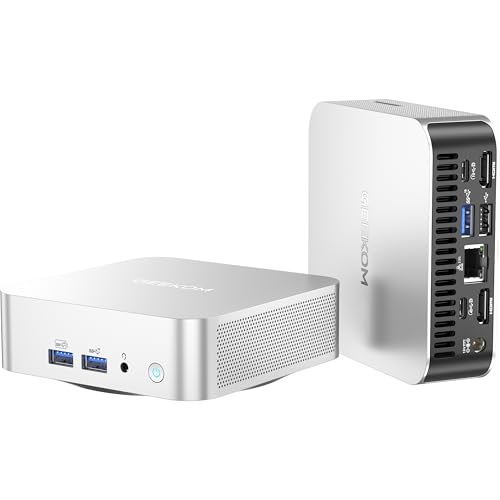
- Best for: Analysts who store big local datasets and want the most built-in storage in this guide.
- Processor: AMD Ryzen 9 8945HS, 8 cores / 16 threads, up to 5.2 GHz
- Graphics: AMD Radeon 780M
- Memory: 32GB DDR5 5600MHz, up to 64GB
- Storage: 2TB PCIe 4.0 SSD
All 5 Picks at a Glance
| Product | Specs | Action |
|---|---|---|
| Beelink SER8 Ryzen 7 8845HS |
| Check price on Amazon |
| MINISFORUM UM790 Pro Ryzen 9 7940HS |
| Check price on Amazon |
| GEEKOM A8 Ryzen 9 8945HS |
| Check price on Amazon |
 GMKtec K8 Plus Ryzen 7 8845HS |
| Check price on Amazon |
 MINISFORUM UM890 Pro Ryzen 9 8945HS |
| Check price on Amazon |
Key takeaways
- Compare five Ryzen mini PCs built for data analysis, from 32GB DDR5 workhorses to dual-LAN models, and find the small desktop that fits your datasets.
Data analysis is mostly waiting: waiting for a spreadsheet to recalculate, waiting for a Python notebook to finish a groupby, waiting for a dashboard to load a fresh extract. The real decision is not which mini PC looks fastest on paper, but which one keeps a large dataset in memory, holds its speed through a long job, and still leaves room for the next project. A Ryzen mini PC earns its place on a desk by pairing a strong multi-core processor with plenty of RAM and fast storage in a box that disappears behind a monitor.
This guide is for analysts, students, and small-team data workers who run Excel, Python, R, SQL clients, and BI tools on a Windows desktop. Every machine below was picked from its Amazon listing by processor, memory, storage, and connectivity, with all five running AMD Ryzen silicon and none sharing a chassis with an Intel model.
Quick Picks
As an Amazon Associate we earn from qualifying purchases.
| Product | Best for | Key spec from title |
|---|---|---|
| Beelink SER8 Ryzen 7 8845HS | Everyday analysis on a quiet desk | Ryzen 7 8845HS, 32GB DDR5, 1TB SSD |
| MINISFORUM UM790 Pro Ryzen 9 7940HS | Heavy multitasking across four screens | Ryzen 9 7940HS, 32GB DDR5, 1TB SSD |
| GEEKOM A8 Ryzen 9 8945HS | Large local datasets and long sessions | Ryzen 9 8945HS, 32GB DDR5, 2TB SSD |
| GMKtec K8 Plus Ryzen 7 8845HS | Networked data work and dual-LAN setups | Ryzen 7 8845HS, 32GB DDR5, 1TB SSD |
| MINISFORUM UM890 Pro Ryzen 9 8945HS | Demanding workloads with room to grow | Ryzen 9 8945HS, 32GB DDR5, 1TB SSD |
How to Choose
Match the processor to your workload
Data work splits into two kinds of jobs. Spreadsheet formulas, filters, and pivots lean on single-core speed, while grouping, joining, and aggregating million-row tables lean on core count. An eight-core Ryzen 7 or Ryzen 9 handles both, and the Hawk Point chips in this guide add a neural processing unit that newer Windows features can use. If your day is mostly Excel and browser-based dashboards, a Ryzen 7 8845HS is plenty. If you regularly run Python notebooks alongside a database and a BI tool, step up to a Ryzen 9 8945HS or 7940HS for the extra headroom.
Buy enough memory on day one
Memory is the single biggest bottleneck in data analysis. A dataset that fits in RAM gets filtered and aggregated in seconds; one that spills to disk slows to a crawl no matter how fast the processor is. Thirty-two gigabytes is the sensible floor for serious work, and every machine in this guide ships with that much. Check that the memory sits in two SO-DIMM slots rather than soldered to the board, because two slots mean you can add a second stick later instead of replacing the whole machine when your datasets grow.
Storage speed and space both matter
Raw data files, extracts, and model outputs pile up fast, so a 1TB drive is the floor and 2TB is worth having if you keep several projects live at once. Just as important is the drive interface: a PCIe 4.0 NVMe SSD moves large files far quicker than older SATA storage, which matters when you load a multi-gigabyte CSV or refresh a local database. Look for a second M.2 slot as well, because adding a second drive later is cheaper and simpler than migrating everything to a bigger one.
Ports decide how the machine fits your desk
Analysts live across monitors, external drives, and wired networks. Two display outputs are the minimum, and the machines here provide three or four, so a dual-monitor setup leaves a port spare for a TV or a third screen. A USB4 port moves data from a fast external SSD at full speed and can drive a display at the same time. Dual 2.5GbE LAN ports matter if you pull data from a local server or NAS, and Wi-Fi 6E keeps wireless transfers quick when a cable is not practical.
The 5 Best Options
Beelink SER8 Ryzen 7 8845HS
- Best for: Analysts who want a quiet, well-rounded machine for daily spreadsheet and notebook work.
- Processor: AMD Ryzen 7 8845HS, 8 cores / 16 threads, up to 5.1 GHz
- Graphics: AMD Radeon 780M
- Memory: 32GB DDR5 5600MHz, two SO-DIMM slots
- Storage: 1TB M.2 PCIe 4.0 SSD, second M.2 slot
Analysts who want a quiet, well-rounded machine for daily spreadsheet and notebook work.
The maximum memory figure varies between sources, so confirm the upgrade ceiling on the listing before planning a RAM upgrade.
The SER8 is the balanced pick for analysts who want a capable machine without overbuying. Its Ryzen 7 8845HS pairs eight Zen 4 cores with Radeon 780M graphics, and the vapor-chamber cooling keeps it quiet during long calculation runs. With 32GB of DDR5 and a 1TB PCIe 4.0 drive, it handles large spreadsheets, Python notebooks, and browser dashboards side by side, and the USB4 port covers fast external storage when a project outgrows the internal drive.
Watch out for: The maximum memory figure varies between sources, so confirm the upgrade ceiling on the listing before planning a RAM upgrade.
MINISFORUM UM790 Pro Ryzen 9 7940HS
- Best for: Multi-monitor analysts who run a database client, a notebook, and a dashboard at the same time.
- Processor: AMD Ryzen 9 7940HS, 8 cores / 16 threads, up to 5.2 GHz
- Graphics: AMD Radeon 780M
- Memory: 32GB DDR5, two SO-DIMM slots
- Storage: 1TB PCIe 4.0 SSD, dual M.2 2280 slots
Multi-monitor analysts who run a database client, a notebook, and a dashboard at the same time.
The listing family includes a barebone version without memory or storage, so check the configuration picker matches the 32GB and 1TB build.
The UM790 Pro suits analysts who keep many windows open at once. Its Ryzen 9 7940HS boosts to 5.2 GHz, and the port set is unusually generous for a box this size, with two HDMI 2.1 ports and two USB4 ports driving up to four displays. That makes it a natural fit for a desk with a main monitor, a second screen for reference data, and a third for a dashboard. Dual M.2 PCIe 4.0 slots give storage room to grow as extract files accumulate.
Watch out for: The listing family includes a barebone version without memory or storage, so check the configuration picker matches the 32GB and 1TB build.
GEEKOM A8 Ryzen 9 8945HS
- Best for: Analysts who store big local datasets and want the most built-in storage in this guide.
- Processor: AMD Ryzen 9 8945HS, 8 cores / 16 threads, up to 5.2 GHz
- Graphics: AMD Radeon 780M
- Memory: 32GB DDR5 5600MHz, up to 64GB
- Storage: 2TB PCIe 4.0 SSD
Analysts who store big local datasets and want the most built-in storage in this guide.
A separate A8 Max listing was reported unavailable, so make sure the listing you open is the standard A8 with the 2TB drive.
The A8 is the pick for analysts who keep large datasets on the machine itself. Its 2TB PCIe 4.0 SSD is double the storage of the other picks here, so several projects, extracts, and model outputs can live side by side without constant housekeeping. The Ryzen 9 8945HS brings eight cores, a 5.2 GHz boost, and a Ryzen AI engine, while the SD card slot is handy for ingesting data from cameras and field devices. It is the most storage-forward machine in this guide.
Watch out for: A separate A8 Max listing was reported unavailable, so make sure the listing you open is the standard A8 with the 2TB drive.
GMKtec K8 Plus Ryzen 7 8845HS
- Best for: Analysts who pull data over a wired network and want dual LAN plus an eGPU path.
- Processor: AMD Ryzen 7 8845HS, 8 cores / 16 threads, up to 5.1 GHz
- Graphics: AMD Radeon 780M
- Memory: 32GB DDR5 5600MHz, expandable to 128GB
- Storage: 1TB PCIe 4.0 SSD
Analysts who pull data over a wired network and want dual LAN plus an eGPU path.
The listing family has several memory and storage combinations, so verify the configuration picker shows 32GB of RAM and a 1TB SSD before buying.
The K8 Plus is built for analysts whose data lives on a network. Dual 2.5GbE LAN ports let one connection pull from a server or NAS while the other stays on the office network, and the OCuLink port leaves the door open for an external graphics card later. Its Ryzen 7 8845HS, 32GB of DDR5, and 1TB SSD cover the same daily workload as the other Ryzen 7 pick, while the port set leans toward connectivity-heavy setups and small home labs that double as analysis machines.
Watch out for: The listing family has several memory and storage combinations, so verify the configuration picker shows 32GB of RAM and a 1TB SSD before buying.
MINISFORUM UM890 Pro Ryzen 9 8945HS
- Best for: Power users who want the strongest processor and the most memory headroom in this guide.
- Processor: AMD Ryzen 9 8945HS, 8 cores / 16 threads, up to 5.2 GHz
- Graphics: AMD Radeon 780M, up to 2800 MHz
- Memory: 32GB DDR5 5600MHz, expandable to 96GB
- Storage: 1TB PCIe 4.0 SSD, dual M.2 slots, up to 8TB total
Power users who want the strongest processor and the most memory headroom in this guide.
Some sources describe the OCuLink connection as needing an M.2 adapter rather than a built-in port, so check the listing if an external graphics card is part of your plan.
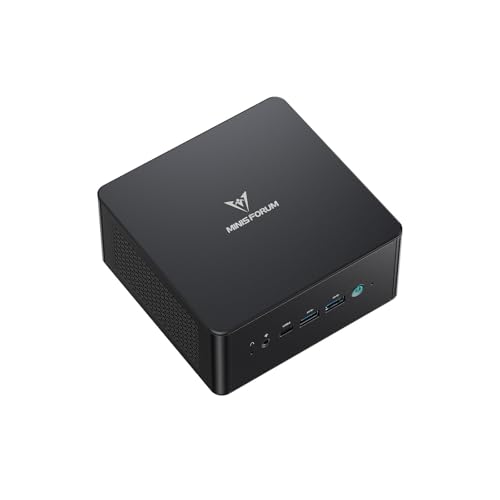
The UM890 Pro is the most expandable machine in this guide. Its Ryzen 9 8945HS runs a 70W performance mode that holds speed through sustained jobs, and the memory grows to 96GB across two SO-DIMM slots, which is the largest upgrade ceiling here. Two USB4 ports, HDMI 2.1, and DisplayPort 1.4 drive four displays, while dual 2.5GbE LAN ports suit networked data work. It is the pick when today’s workload is heavy and tomorrow’s will be heavier.
Watch out for: Some sources describe the OCuLink connection as needing an M.2 adapter rather than a built-in port, so check the listing if an external graphics card is part of your plan.
Which One Fits Your Situation
You work in Excel and browser dashboards all day
Pick the Beelink SER8. Its Ryzen 7 8845HS, 32GB of DDR5, and 1TB SSD cover spreadsheets, pivots, and dashboard tabs without strain, and the quiet cooling suits a shared office. The USB4 port handles a fast external drive when a project grows, so this is the sensible default for most analysts.
You juggle a notebook, a database, and a dashboard at once
Pick the MINISFORUM UM790 Pro. Two HDMI ports and two USB4 ports drive up to four displays, so each tool gets its own screen and you stop alt-tabbing between windows. The Ryzen 9 7940HS keeps the extra windows responsive, and the second M.2 slot gives storage room as extract files pile up.
Your datasets live on the machine, not in the cloud
Pick the GEEKOM A8. Its 2TB SSD holds several projects and their extracts without constant cleanup, and the Ryzen 9 8945HS chews through local aggregations quickly. The SD slot also helps when data arrives on cards from cameras or field equipment, and the roomy drive means archived projects can stay on the machine.
You pull data over a wired network and plan to upgrade
Pick the MINISFORUM UM890 Pro if you want the most headroom, or the GMKtec K8 Plus if dual LAN and the OCuLink port matter more. Both carry dual 2.5GbE ports for fast wired transfers, and the UM890 Pro adds a 96GB memory ceiling for datasets that keep growing year after year.
Common Mistakes
- Buying 16GB of RAM to save money, then watching large datasets spill to disk and slow every calculation.
- Choosing a mini PC with soldered memory, which locks the machine at its shipped RAM for its whole life.
- Ignoring the second M.2 slot and discovering too late that the single drive is full of extracts.
- Running a dual-monitor setup on a machine with only one display output and a dongle that cannot keep up.
- Picking a barebone listing by accident and receiving a machine with no memory or storage installed.
Frequently Asked Questions
Is a Ryzen mini PC fast enough for data analysis?
Yes, for most analysis work. An eight-core Ryzen 7 or Ryzen 9 with 32GB of DDR5 handles large spreadsheets, Python notebooks, SQL clients, and BI dashboards comfortably. The bottleneck is usually memory or storage speed, not the processor, which is why every pick here ships with 32GB of RAM and a PCIe 4.0 SSD.
How much RAM do I need for data analysis?
Thirty-two gigabytes is the practical minimum for serious work. It keeps million-row tables, browser tabs, and a notebook in memory at the same time. If you work with datasets above a few gigabytes or run several heavy tools at once, choose a machine with two SO-DIMM slots so you can upgrade to 64GB or more later.
Do I need a dedicated graphics card for data analysis?
No, not for the usual tools. Spreadsheet work, SQL, Python, R, and dashboards run well on the built-in Radeon 780M graphics in these Ryzen chips. A dedicated card only matters for GPU-accelerated machine learning or heavy 3D visualization, and the K8 Plus keeps that path open through its OCuLink port.
Can a mini PC drive two monitors for analysis work?
Yes. Every machine in this guide supports at least three displays, and several support four. A dual-monitor setup works out of the box with the HDMI and DisplayPort or USB4 outputs, giving you one screen for your working file and another for reference data or a dashboard.