Our Short List of 3

- Best for: A creator who wants a factory-configured RTX workstation that handles color work and virtual machines in one machine.
- 16″ 3.2K (3200×2000) OLED touch display, 120 Hz, 0.2 ms response, 100% DCI-P3, Pantone-validated, 500 nits, Delta E < 2
- Intel Core i9-13980HX, up to 5.6 GHz, 24 cores
- NVIDIA GeForce RTX 4060 8 GB GDDR6 (RTX Studio)
- 16 GB DDR5, upgradable

- Best for: A creator who wants a small, light 2-in-1 with a dedicated GPU and 32 GB of memory for working on the move.
- 13.3″ AMOLED 2.8K (2880×1800) 60 Hz touchscreen, 500 nits
- AMD Ryzen AI 9 HX 370, up to 5.1 GHz, 12 cores
- NVIDIA GeForce RTX 4050 6 GB GDDR6
- 32 GB LPDDR5X

- Best for: A creator who keeps several large virtual disks locally and wants 4 TB of fast internal storage in one laptop.
- 16.0″ AMOLED 4K (3840×2400) 60 Hz touchscreen
- AMD Ryzen AI 9 HX 370, up to 5.1 GHz, 12 cores
- NVIDIA GeForce RTX 4060 8 GB GDDR6
- 32 GB LPDDR5X
All 5 Picks at a Glance
| Product | Specs | Action |
|---|---|---|
| ASUS ProArt P16 (2024) |
| Check price on Amazon |
| ASUS ProArt PX13 (2025) |
| Check price on Amazon |
| ASUS ProArt P16 (4 TB configuration) |
| Check price on Amazon |
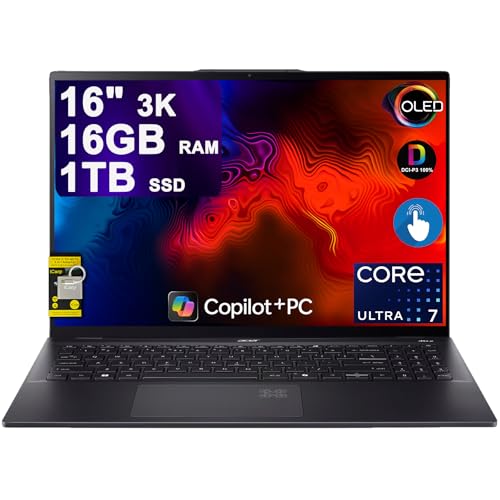 Acer Swift 16 AI |
| Check price on Amazon |
 Samsung Galaxy Book4 Pro 14 |
| Check price on Amazon |
Key takeaways
- Compare five OLED creator laptops for virtual machine work, from a factory RTX workstation to thin ultraportables, with honest notes on RAM, GPUs and sellers.
Running virtual machines on a creator laptop is a balancing act. You need a color-accurate OLED panel for photo and video work, enough memory and processor headroom to keep a guest system responsive, and storage fast enough that a virtual disk does not feel sluggish. The five laptops below were picked from their Amazon listings for exactly that mix: OLED displays aimed at creators, strong modern processors, and configurations that make sense for VM workloads.
This guide covers both ends of the range, from a 16-inch RTX workstation to a 14-inch ultraportable with integrated graphics, and it is honest about the trade-offs. Two of the ASUS models come from third-party sellers who open the seal to upgrade hardware, and one Samsung listing shows conflicting memory figures, so each pick carries a clear note on what to check before you order.
Quick Picks
As an Amazon Associate we earn from qualifying purchases
| Product | Best for | Key spec from title |
|---|---|---|
| ASUS ProArt P16 (2024) | A factory RTX workstation for color work and VMs | 16″ 3.2K OLED touch, 120 Hz, RTX 4060 |
| ASUS ProArt PX13 (2025) | A compact 2-in-1 for creators on the move | 13.3″ 2.8K AMOLED touch, RTX 4050, 32 GB RAM |
| ASUS ProArt P16 (4 TB) | Large local VM storage in one machine | 16″ 4K AMOLED touch, RTX 4060, 4 TB SSD |
| Acer Swift 16 AI | A light 16″ OLED laptop for lighter VM loads | 16″ 3K OLED touch, 120 Hz, 100% DCI-P3 |
| Samsung Galaxy Book4 Pro 14 | The thinnest, lightest pick for travel | 14″ 3K Dynamic AMOLED 2X, 120 Hz, 2.71 lbs |
How to Choose
Start with the OLED panel, not the processor
A creator laptop earns its keep through the screen, so read the panel specs before anything else. Look for wide color coverage such as 100% DCI-P3, a Pantone-validated panel, and a low Delta E figure, because those tell you the display was built for color-critical work rather than just bright colors. Resolution matters too: a 3.2K or 4K OLED panel shows fine detail in timelines and photo edits, while a 120 Hz refresh rate makes scrolling and pen input feel smoother. Touch support is a bonus for direct editing. If the listing is vague about color coverage, treat that as a warning sign and move on.
Give your virtual machines enough memory
A virtual machine is a software workload that shares the laptop’s memory with the host system, so RAM is where most VM setups feel tight first. The host operating system, your creative apps, and each guest system all draw from the same pool, and once that pool runs low everything slows down together. A 32 GB configuration gives you far more breathing room than a 16 GB one when a guest system is running alongside editing software. Where the listing says the memory is upgradable, that is a real advantage, since you can add capacity later instead of replacing the whole machine.
Match the graphics to the work you actually run
Not every VM workload needs a dedicated graphics card, so be honest about what you will actually do inside the guest system. A dedicated RTX card helps when your creator apps use GPU acceleration or when a guest system runs graphics-heavy software, and the two RTX picks below are the right tools for that kind of work. Integrated graphics, such as the Intel Arc graphics in the Acer and Samsung picks, handle everyday VM tasks, office work, and light editing without trouble. The mistake is expecting an integrated-graphics ultraportable to behave like a GPU workstation; buy the graphics for the heaviest job you will really run.
Check storage, ports, and who is actually selling it
Virtual disks grow fast, so storage capacity and speed deserve the same attention as the processor. A 1 TB NVMe SSD is a sensible floor, while a 4 TB configuration suits someone who keeps several large virtual disks on the machine itself. Ports matter as well: Thunderbolt 4 and USB 4.0 make external drives and displays far more useful, and an SD reader saves a dongle for camera work. Finally, check the seller. Two of the ASUS models below come from third-party sellers who open the seal to upgrade hardware, which is a different proposition from a factory configuration, so read the listing carefully before ordering.
The 5 Best Options
ASUS ProArt P16 (2024)
- Best for: A creator who wants a factory-configured RTX workstation that handles color work and virtual machines in one machine.
- 16″ 3.2K (3200×2000) OLED touch display, 120 Hz, 0.2 ms response, 100% DCI-P3, Pantone-validated, 500 nits, Delta E < 2
- Intel Core i9-13980HX, up to 5.6 GHz, 24 cores
- NVIDIA GeForce RTX 4060 8 GB GDDR6 (RTX Studio)
- 16 GB DDR5, upgradable
A creator who wants a factory-configured RTX workstation that handles color work and virtual machines in one machine.
This is the 16 GB configuration, not the 32 GB variant, so if you run several guest systems at once, plan a memory upgrade.
The 2024 ProArt P16 is the cleanest factory listing in this guide and the most straightforward pick for someone who wants one machine for color work and virtual machines. Its 16-inch 3.2K OLED touch panel runs at 120 Hz with 100% DCI-P3 coverage and Pantone validation, so color-critical editing looks right, and the RTX 4060 gives GPU-accelerated apps real headroom. The Core i9 processor and 1 TB NVMe drive keep both the host and guest systems responsive, and the memory is upgradable if your VM setup grows later.
Watch out for: This is the 16 GB configuration, not the 32 GB variant, so if you run several guest systems at once, plan a memory upgrade.
ASUS ProArt PX13 (2025)
- Best for: A creator who wants a small, light 2-in-1 with a dedicated GPU and 32 GB of memory for working on the move.
- 13.3″ AMOLED 2.8K (2880×1800) 60 Hz touchscreen, 500 nits
- AMD Ryzen AI 9 HX 370, up to 5.1 GHz, 12 cores
- NVIDIA GeForce RTX 4050 6 GB GDDR6
- 32 GB LPDDR5X
A creator who wants a small, light 2-in-1 with a dedicated GPU and 32 GB of memory for working on the move.
This is a third-party upgraded-seller listing (GreatPriceTech, seal opened for hardware and software upgrade only), not a factory configuration. The panel is 2.8K (2880×1800), not 3K as the title says.
The ProArt PX13 is the compact pick of the group, a 13.3-inch 2-in-1 convertible that trades screen size for portability without giving up a dedicated graphics card. Its AMOLED touch panel, Ryzen AI 9 processor, and 32 GB of memory make it a strong small machine for creators who work away from a desk and still want to run a guest system alongside their editing apps. The 73 Wh battery, Wi-Fi 7, and full set of ports including two USB 4.0 Type-C connections round out a travel-friendly package that still feels like a workstation.
Watch out for: This is a third-party upgraded-seller listing (GreatPriceTech, seal opened for hardware and software upgrade only), not a factory configuration. The panel is 2.8K (2880×1800), not 3K as the title says.
ASUS ProArt P16 (4 TB configuration)
- Best for: A creator who keeps several large virtual disks locally and wants 4 TB of fast internal storage in one laptop.
- 16.0″ AMOLED 4K (3840×2400) 60 Hz touchscreen
- AMD Ryzen AI 9 HX 370, up to 5.1 GHz, 12 cores
- NVIDIA GeForce RTX 4060 8 GB GDDR6
- 32 GB LPDDR5X
A creator who keeps several large virtual disks locally and wants 4 TB of fast internal storage in one laptop.
This is a third-party upgraded-seller listing (GreatPriceTech, seal opened for upgrade), so do not treat the 4 TB configuration as a factory build.
This ProArt P16 is the storage pick: a 16-inch AMOLED machine with a 4 TB solid-state setup that suits someone who keeps several large virtual disks on the laptop itself instead of on external drives. It pairs that storage with a Ryzen AI 9 processor, an RTX 4060, and 32 GB of memory, so the hardware around the storage is genuinely capable, and the 90 Wh battery and Thunderbolt 4 port keep it usable away from a desk. If your virtual disks are the bottleneck, this is the configuration built around solving it.
Watch out for: This is a third-party upgraded-seller listing (GreatPriceTech, seal opened for upgrade), so do not treat the 4 TB configuration as a factory build.
Acer Swift 16 AI
- Best for: A creator whose VM work is light and who wants a large OLED screen in a thin, portable laptop.
- 16″ 3K (2880×1800) OLED 120 Hz touchscreen, 100% DCI-P3
- Intel Core Ultra 7 256V, 8-core, up to 47 TOPS
- 16 GB RAM
- 1 TB SSD
A creator whose VM work is light and who wants a large OLED screen in a thin, portable laptop.
Integrated graphics only, with no dedicated GPU, so keep graphics expectations modest for heavier VM loads. This is a third-party seller listing (ICP Hub bundle), so verify the seller and the live listing before ordering.
The Acer Swift 16 AI is the honest lightweight pick: a 16-inch 3K OLED touch display with 100% DCI-P3 coverage, a modern Core Ultra 7 processor, and a thin profile, but integrated graphics only. That makes it a good fit for lighter VM work, office tasks, and editing that does not lean on a dedicated GPU, while the 120 Hz OLED panel still delivers the color and smoothness creators want. Two Thunderbolt 4 ports, HDMI 2.1, a fingerprint reader, and Wi-Fi 7 round out a well-connected ultraportable.
Watch out for: Integrated graphics only, with no dedicated GPU, so keep graphics expectations modest for heavier VM loads. This is a third-party seller listing (ICP Hub bundle), so verify the seller and the live listing before ordering.
Samsung Galaxy Book4 Pro 14
- Best for: A creator who travels constantly and wants the lightest OLED laptop here for lighter VM work on the road.
- 14″ 3K (2880×1800) Dynamic AMOLED 2X touchscreen, 120 Hz adaptive
- Intel Core Ultra 7 155H
- Intel Arc Graphics (integrated)
- 512 GB SSD
A creator who travels constantly and wants the lightest OLED laptop here for lighter VM work on the road.
The listing data shows conflicting RAM figures across crawls, so check the live listing before ordering rather than trusting a single number. The 512 GB SSD is also the smallest storage in this guide.
The Galaxy Book4 Pro 14 is the thinnest and lightest laptop in this guide, and the pick for creators who travel constantly. Its 14-inch 3K Dynamic AMOLED 2X touchscreen runs at an adaptive 120 Hz, the whole machine weighs 2.71 lbs and measures 11.6 mm thick, and the anti-reflective screen helps in bright rooms. A Core Ultra 7 processor, integrated Intel Arc Graphics, and a 63 Wh battery make it a capable everyday machine for lighter VM work, while Samsung Knox and Secured Core PC add security features for work machines.
Watch out for: The listing data shows conflicting RAM figures across crawls, so check the live listing before ordering rather than trusting a single number. The 512 GB SSD is also the smallest storage in this guide.
Which One Fits Your Situation
You want one machine for color work and VMs
Choose the 2024 ASUS ProArt P16. It is the only factory listing here, with a Pantone-validated 3.2K OLED panel, an RTX 4060, and a Core i9, so it covers both color-critical editing and demanding guest systems without the caveats of an upgraded-seller listing. Its memory is upgradable, which matters if your VM setup grows.
You travel and need a small, light creator laptop
Choose the ASUS ProArt PX13 if you want a dedicated GPU in a 13.3-inch 2-in-1, or the Samsung Galaxy Book4 Pro 14 if thin and light matters most. The PX13 gives you an RTX 4050 and 32 GB of memory in a compact body, while the Samsung is the lightest machine here at 2.71 lbs, with the trade-off of integrated graphics and a smaller SSD.
You keep several large virtual disks locally
Choose the 4 TB ASUS ProArt P16. Its two 2 TB NVMe drives give you room for multiple large virtual disks without juggling external storage, and the RTX 4060 and 32 GB of memory keep the machine capable around that storage. Just remember it is a third-party upgraded configuration, not a factory build, so check the listing carefully.
Your VM work is light and you want the thinnest machine
Choose the Acer Swift 16 AI or the Samsung Galaxy Book4 Pro 14. Both use integrated Intel Arc Graphics, which suits everyday VM tasks and light editing, and both pair a color-accurate OLED panel with a thin, portable body. The Acer gives you a larger 16-inch screen, while the Samsung is lighter and thinner.
Common Mistakes
- Buying on panel size alone and forgetting that RAM is where VM setups feel tight first.
- Assuming every ProArt listing is a factory configuration, when two of the models here come from third-party sellers who open the seal to upgrade hardware.
- Expecting an integrated-graphics ultraportable to behave like a dedicated-GPU workstation inside a guest system.
- Trusting a single RAM figure when the listing data conflicts, as it does for the Samsung Galaxy Book4 Pro 14.
- Ignoring storage capacity, since virtual disks grow fast and a 512 GB drive fills up sooner than most buyers expect.
Frequently Asked Questions
Can these laptops run virtual machines?
Yes. Running a virtual machine is a software workload, so what matters is the hardware underneath it: a strong processor, enough memory for the host and guest systems together, and fast NVMe storage for the virtual disk. Every laptop in this guide was chosen for those specs as stated on its Amazon listing. No VM counts or benchmarks are claimed here, because the listings do not state them.
Is 16 GB of RAM enough for virtual machines?
It depends on how many guest systems you run at once. A single light guest system alongside everyday apps can work on 16 GB, but the host system, your creative software, and the guest all share the same memory. If you plan to run a guest system while editing, 32 GB gives you far more headroom, and the 2024 ProArt P16 has upgradable memory if you start at 16 GB.
Do I need a dedicated GPU for VM work?
Not always. A dedicated RTX card helps when your creator apps use GPU acceleration or when a guest system runs graphics-heavy software. For everyday VM tasks, office work, and light editing, the integrated Intel Arc Graphics in the Acer and Samsung picks is enough. Match the graphics to the heaviest job you will really run, rather than buying a GPU you will never use.
Why do two ProArt listings mention an opened seal?
The PX13 and the 4 TB ProArt P16 are sold by a third-party seller, GreatPriceTech, which opens the seal to upgrade the hardware and software before shipping. That is different from a factory configuration, so the storage and memory figures on those listings reflect the seller’s upgrades. Check the live listing and the seller before ordering either one.