Our Short List of 3

- Best for: Traveling creators who review and cut footage on location.
- Display: 13.3-inch OLED touch panel, 3K (2880 x 1800), 500 nits
- Processor: AMD Ryzen AI 9 HX 370
- Graphics: NVIDIA GeForce RTX 4050, 6GB GDDR6
- Memory: 32GB LPDDR5X
- Best for: Editors who split time between a desk and travel days.
- Display: 14.5-inch OLED touch panel, 3200 x 2000, 48-120Hz, 400 nits
- Color: 100 percent DCI-P3
- Processor: Intel Core Ultra 7 255H
- Graphics: Intel Arc (integrated)

- Best for: Editors who present work to clients and cut in the same session.
- Display: 14-inch OLED touch panel, 2880 x 1800
- Processor: Intel Core Ultra 7 155H
- Graphics: Intel Arc (integrated)
- Memory: 32GB LPDDR5
All 4 Picks at a Glance
| Product | Specs | Action |
|---|---|---|
| ASUS ProArt PX13 (HN7306WU) |
| Check price on Amazon |
| Dell XPS 14 Premium (DA14250) |
| Check price on Amazon |
| HP Spectre x360 14 |
| Check price on Amazon |
 Lenovo Yoga Slim 7x |
| Check price on Amazon |
Key takeaways
- Find the best oled creator laptops for video editing, with wide-gamut OLED panels, RTX graphics, and memory that keeps long timelines responsive.
Choosing an OLED laptop for video editing comes down to one decision: how much panel and graphics headroom your footage actually needs. A color-accurate OLED screen shows shadow detail and saturation the way a graded export will look, but resolution, refresh behavior, memory, and graphics vary widely between models. Picking on screen size alone leaves editors with machines that scrub smoothly on simple cuts yet stall once effects, titles, and layered audio pile onto a timeline.
This guide serves three kinds of buyers: desk editors cutting long 4K projects, traveling creators who need a compact machine, and newcomers moving up from an older laptop. Every pick below is a laptop with an OLED display sold for creative work, and each name, panel figure, processor, and memory figure comes from the names and specification fields on the Amazon product pages, so you can match a machine to your footage rather than to a headline claim.
Quick Picks
As an Amazon Associate we earn from qualifying purchases
| Product | Best for | Key spec from title |
|---|---|---|
| ASUS ProArt P16 (H7606WP) | Cutting long 4K projects at a desk | 16-inch 3K OLED touch, 120Hz |
| ASUS ProArt PX13 (HN7306WU) | Reviewing and cutting footage on location | 13.3-inch 3K OLED touch, 2-in-1 |
| Dell XPS 14 Premium (DA14250) | Mixing desk editing with travel days | 14.5-inch 3.2K OLED touch |
| HP Spectre x360 14 | Presenting cuts to clients in person | 14-inch 2.8K OLED touch |
| Lenovo Yoga Slim 7x | Publishing short clips from bright locations | 14.5-inch 3K OLED, 1000 nits |
How to Choose
Panel resolution and color coverage
Read the panel line before anything else. A 2880 by 1800 or higher OLED panel gives a timeline and preview monitor enough room on a 14 to 16 inch screen, and wide DCI-P3 coverage matters when you grade footage meant for online delivery. Touch support helps when you scrub by hand or mark clips with a pen. Note the peak brightness figure too: a panel listed near 1000 nits holds up in bright rooms, while a 400 or 500 nit panel suits a shaded desk better.
Graphics for effects and exports
A dedicated NVIDIA GeForce RTX graphics card changes how an editor feels on effects-heavy work: color tools, noise reduction, and export encoding lean on the graphics chip, and listings name the exact card and its memory. Integrated Intel Arc or Radeon graphics handle plain cuts and light color work well, yet they share system memory. If your projects stack effects, pick a listing with a named RTX card; if your edits stay simple, integrated graphics keep a machine slim and quiet.
Memory and storage headroom
Editors feel memory limits as stalled previews once several clips, stills, and audio tracks share a timeline. A listing with 32GB of RAM suits long 4K projects and multitrack work, while 16GB covers short-form edits with fewer layers. Storage fills quickly with camera originals, so a 1TB or larger solid state drive keeps current projects local. Check whether the listing names memory as onboard or soldered, because that decides whether you can add more later or must choose the right amount now.
Size, ports, and daily handling
Screen size shapes how you work away from a desk. A 16 inch panel shows more of a timeline without an external monitor, while a 13 or 14 inch machine slips into a camera bag and still drives a larger screen over HDMI or Thunderbolt. Read the port list on the listing: an SD card reader speeds up ingest from a camera, and Thunderbolt ports add docks and fast drives. Weight figures on the page tell you what a full day of carrying the machine will feel like.
The 5 Best Options
ASUS ProArt P16 (H7606WP)
The ProArt P16 suits editors whose main machine must handle long 4K timelines, layered effects, and color work without a separate desktop. Its 16 inch OLED touch panel runs at 2880 by 1800 with a 120Hz refresh figure, and the RTX 5070 graphics card gives editing software a dedicated chip for effects and exports. With 32GB of memory and 4TB of storage, it holds big project folders locally. The trade-off is size: at a listed 4.08 pounds plus a power supply, it reads as a desk machine that travels occasionally rather than a daily carry.
Specs
- Display: 16-inch OLED touch panel, 2880 x 1800, 120Hz
- Processor: AMD Ryzen AI 9 HX 370, up to 5.1 GHz
- Graphics: NVIDIA GeForce RTX 5070, 8GB
- Memory: 32GB LPDDR5X
- Storage: 4TB PCIe SSD (2 x 2TB)
- Windows: 11 Home
- Weight: 4.08 pounds
Best for: Desk-based editors cutting long 4K projects with layered effects.
Watch out for: This is a build-to-order listing from an authorized ASUS seller, so confirm the configuration on the page matches the title before ordering.
ASIN: B0FVCVY7KH
ASUS ProArt PX13 (HN7306WU)
- Best for: Traveling creators who review and cut footage on location.
- Display: 13.3-inch OLED touch panel, 3K (2880 x 1800), 500 nits
- Processor: AMD Ryzen AI 9 HX 370
- Graphics: NVIDIA GeForce RTX 4050, 6GB GDDR6
- Memory: 32GB LPDDR5X
Traveling creators who review and cut footage on location.
The small panel crowds a full timeline, so plan on an external monitor for long desk sessions, and note the listing says the seal is opened for upgrades by the seller.
The ProArt PX13 fits creators who shoot and cut away from home and want a machine that doubles as a tablet for reviewing footage with clients. The 13.3 inch OLED touch panel folds back in a 2-in-1 body, and the RTX 4050 graphics card still gives editing software dedicated hardware for effects and exports. Ryzen AI 9 processing with 32GB of memory keeps timelines moving, while the compact body and listed pen-friendly screen suit sketching thumbnails and marking selects between shoots.
Dell XPS 14 Premium (DA14250)
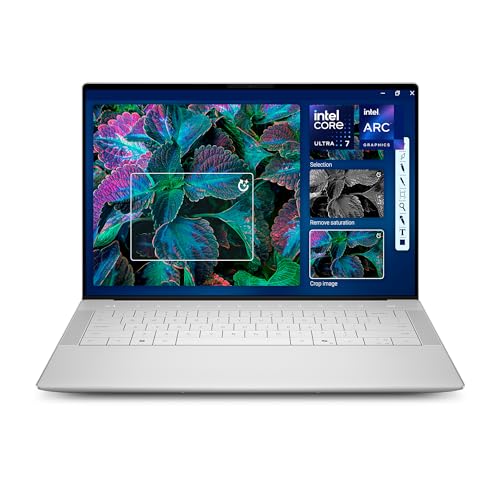
- Best for: Editors who split time between a desk and travel days.
- Display: 14.5-inch OLED touch panel, 3200 x 2000, 48-120Hz, 400 nits
- Color: 100 percent DCI-P3
- Processor: Intel Core Ultra 7 255H
- Graphics: Intel Arc (integrated)
Editors who split time between a desk and travel days.
This configuration uses integrated graphics, so confirm your effects workload fits before choosing it over an RTX model.
The Dell XPS 14 Premium suits editors who want a sharp OLED panel and a clean, compact chassis for a mix of desk and travel work. Its 14.5 inch touch panel reaches 3200 by 2000 with a variable 48 to 120Hz refresh figure, and 32GB of memory keeps multitrack projects responsive. Graphics are integrated Intel Arc on this configuration, so it favors cuts, titles, and moderate color work over heavy effects stacks. A fingerprint reader and backlit keyboard round out a listing aimed at daily professional use.
HP Spectre x360 14
- Best for: Editors who present work to clients and cut in the same session.
- Display: 14-inch OLED touch panel, 2880 x 1800
- Processor: Intel Core Ultra 7 155H
- Graphics: Intel Arc (integrated)
- Memory: 32GB LPDDR5
Editors who present work to clients and cut in the same session.
The listing names Windows 10 Home, so read the Windows field on the page carefully before ordering.
The HP Spectre x360 14 fits editors who like a convertible for presenting cuts and then folding back to a laptop for the edit itself. The 14 inch OLED touch panel runs at 2880 by 1800, and the Core Ultra 7 processor pairs with 32GB of memory and a roomy 2TB drive for project files. Thunderbolt 4 ports support docks and fast external storage. Integrated Intel Arc graphics suit narrative cuts and light color work rather than dense effects timelines.
Lenovo Yoga Slim 7x
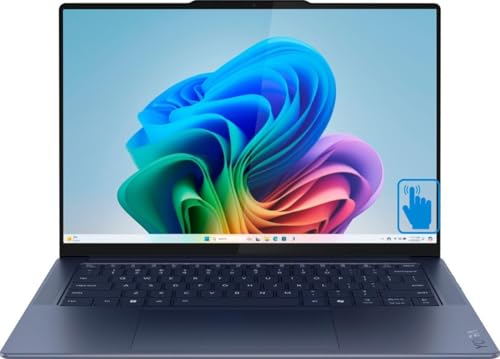
- Best for: Short-form creators who edit in bright, changing locations.
- Display: 14.5-inch OLED touch panel, 3K, 1000 nits
- Processor: Snapdragon X Elite X1E-78-100
- Memory: 16GB
- Storage: 1TB SSD
Short-form creators who edit in bright, changing locations.
Windows on ARM limits some editing apps and plug-ins, so confirm your main editor runs on this platform before ordering.
The Yoga Slim 7x suits creators whose editing stays in short-form and social formats and who value a bright panel and a slim bag-friendly body. Its 14.5 inch OLED touch screen is listed at 1000 nits, which helps in bright rooms and on location. The Snapdragon X Elite processor and 16GB of memory handle cuts and captions smoothly, and Wi-Fi 7 keeps uploads quick. Because it runs Windows on ARM, its fit depends on the editing apps you rely on.
Which One Fits Your Situation
You cut long 4K projects at a desk
Pick the ASUS ProArt P16. Its 16 inch OLED panel shows more of a timeline at once, the RTX 5070 gives effects and exports a dedicated chip, and 4TB of storage keeps camera originals and project folders on the machine. It is the one pick here built to replace a desktop for editing, provided you accept its weight when you do travel.
You travel with a camera bag, not a studio
Pick the ASUS ProArt PX13. The 13.3 inch 2-in-1 body folds flat for reviewing footage, the RTX 4050 still covers effects work, and 32GB of memory keeps location edits moving. You give up screen room compared with the 16 inch machines, yet you gain a laptop that fits small bags and café tables without feeling like a compromise on power.
You present cuts to clients in person
Pick the HP Spectre x360 14. The hinge lets you fold the OLED screen toward a client for a review pass, then fold it back and keep editing. Its 2TB drive holds the project and its exports together, and Thunderbolt 4 covers a dock when you return to a desk. Integrated graphics are the limit to keep in mind for effects-heavy revisions.
You publish short clips from changing locations
Pick the Lenovo Yoga Slim 7x when your work is short-form and your apps run on Windows on ARM. The 1000 nit OLED panel stays readable in bright rooms, and the slim body suits a daily carry. If your editor of choice needs a conventional Intel or AMD machine, the Dell XPS 14 Premium covers the same travel role with a sharper panel.
Common Mistakes
- Choosing on screen size alone and ignoring the graphics card named in the listing.
- Picking 16GB of memory for layered 4K timelines that need room for effects and exports.
- Assuming every OLED panel is equally bright, without reading the nits figure on the page.
- Skipping the platform check on ARM machines, then finding a favorite plug-in missing.
- Overlooking whether memory is onboard, which decides if you can add more later.
Frequently Asked Questions
Is an OLED screen better for color grading than a regular panel?
For most editors, yes. OLED panels show deep blacks and saturated color that match how graded footage looks on phones and televisions, and the picks here list wide DCI-P3 coverage. A regular panel can still work, yet you may miss shadow detail that an OLED screen reveals before export, which leads to extra revision rounds later.
How much RAM does a video editing laptop need?
A 16GB machine handles short clips, simple cuts, and light color work. Long 4K timelines with effects, titles, and several audio tracks feel smoother with 32GB, which is why most picks in this guide carry that amount. Because many creator laptops solder memory in place, the figure in the listing is usually the figure you keep.
Can integrated graphics handle video editing?
Integrated Intel Arc graphics handle timeline playback, cuts, titles, and moderate color work without trouble. The strain shows with stacked effects, noise reduction, and long exports, where a dedicated RTX card finishes sooner and keeps previews fluid. Match the graphics line in the listing to the heaviest project you cut, not the simplest.
Does Windows on ARM run popular editing software?
Some well-known editors now ship ARM versions, while others run through emulation with reduced speed, and certain plug-ins remain unavailable. The Yoga Slim 7x in this guide uses a Snapdragon chip, so check the app list you depend on before choosing it. If your tools lack ARM support, an Intel or AMD pick here avoids the issue.