Our Short List of 3

- View on Amazon: https://www.amazon.com/dp/B0CD36QM5B

- View on Amazon: https://www.amazon.com/dp/B084RDPL6N
- View on Amazon: https://www.amazon.com/dp/B0D3V3H9TC
All 5 Picks at a Glance
| Product | Specs | Action |
|---|---|---|
| 1. NordPass Premium, Unlimited Devices, 1-Year, Password Manager, Digital Code |
| Check price on Amazon |
| 2. Clever Fox Password Book, Pocket Size, Dark Blue |
| Check price on Amazon |
| 3. hi!SCI Password Keeper Book with Colorful Alphabetical Tabs, Pink |
| Check price on Amazon |
 4. JXSELECT Elegant Password Book with Alphabetical Tabs, Turquoise |
| Check price on Amazon |
 5. Panda Planner Password Book with Alphabetical Tabs and Locking Bag, Black |
| Check price on Amazon |
Key takeaways
- Compare the best password manager options for 2026, from a digital subscription with autofill and breach alerts to physical password organizer books with alphabetical tabs.
A password manager solves one problem in two very different ways. The digital route stores your logins in an encrypted vault that fills them in for you on every device you own. The paper route stores them in a dedicated organizer book that never connects to the internet at all. Both are legitimate answers for 2026, and which one suits you depends on how many accounts you juggle, how many devices you sign in on, and how comfortable you are trusting a cloud service with the keys to everything else.
One honest point about shopping for this category on Amazon: mainstream password manager software is not sold there in a boxed retail edition. What Amazon carries is a subscription delivered as a digital code, plus a wide range of printed password organizer books. This guide covers both forms exactly as they are sold. It starts with one digital subscription, NordPass Premium, for readers who want autofill and syncing, then looks at four physical password keeper books in different sizes and styles for readers who prefer their credentials offline, written down, and kept in a drawer.
How to Choose a Password Manager
Decide between a digital vault and a paper book first
This is the real decision, and everything else follows from it. A digital password manager creates, stores, and fills in strong, unique passwords for you, syncs them between your phone and computer, and can warn you when a login shows up in a known data breach. In exchange, your vault lives with an online service and is protected by one master password, so that master password has to be long, unique, and never reused anywhere else. A paper password book keeps everything offline, where no remote attack can reach it, and it never needs a subscription, an app, or an update. In exchange, it cannot autofill anything, it exists in exactly one place, and its security depends entirely on where you store it and who can pick it up.
Many households sensibly use both: a digital manager for everyday logins across devices, and a written record of the most critical accounts — the primary email account, banking, and the master password itself — kept somewhere secure at home as a recovery backup. Whichever route you take, the goal is the same: a different password for every account, recorded somewhere safer than a sticky note or a reused memory.
For software, check devices, autofill, and vault extras
If you go digital, confirm the plan covers every device you actually sign in on, rather than a single computer or phone. Look for autofill that works in browsers and mobile apps, since a manager that is awkward to use gets abandoned within a month. Useful extras to compare include a password health check that flags weak or reused logins, a data breach scanner that watches for your details in known leaks, and tools such as email masking that reduce how often your real address is handed to new services. Also check how the subscription is delivered and renewed: a digital code bought through Amazon activates a fixed term on your account with the provider, and renewal terms can differ from buying directly, so read the listing details before you commit.
For a book, check capacity, tabs, and size
Printed password books differ more than their covers suggest. Capacity is the first spec: pocket books typically hold a few hundred entries, while larger desk formats can hold more than a thousand. Check how entries are organized. Cutout or printed alphabetical tabs let you flip straight to a letter, while books that group several letters into one section take longer to search as they fill up. Entry layout matters too — look for clear lines for the website, username, password, and notes, with enough writing room per entry, especially if your handwriting is large. Finally, match the size to the job: a pocket book suits a bag or a small drawer, a medium book suits most home desks, and a large-format book suits anyone who wants bigger print and more space per login. Sections at the back for internet provider details, router settings, email accounts, and software licenses are a genuine bonus, because those are the details people lose most often.
Plan where the book or master password will live
A password book is only as secure as its storage place. Keep it somewhere private and unremarkable at home rather than next to the computer it describes, and choose a design with a plain, untitled cover so it does not announce its contents on a shelf. Some books add an elastic closure, and one pick in this guide adds a locking storage bag for an extra physical barrier. If you go digital, the equivalent discipline is writing the master password down once, on paper, and storing that paper with the same care — a vault you are locked out of is no better than a forgotten password. For either route, tell a trusted family member where the record is kept, so the accounts can still be reached in an emergency.
1. NordPass Premium, Unlimited Devices, 1-Year, Password Manager, Digital Code
- View on Amazon: https://www.amazon.com/dp/B0CD36QM5B
NordPass Premium is the digital option in this guide, and it is the pick for anyone whose logins are spread across a phone, a laptop, and perhaps a work computer as well. The Amazon listing covers unlimited devices for a one-year term, and the subscription is delivered as a digital code rather than a boxed product, so activation happens through your NordPass account once the code arrives. That format suits this category: there is nothing to install from a disc, and the code simply turns on the Premium tier for the stated term.
Inside the vault, the core job is saving and autofilling login credentials, addresses, and payment details as you browse, so signing in becomes a single confirmation instead of a memory test. Premium adds the monitoring layer that a plain browser password store does not match. A data breach scanner alerts you when your credentials appear in public leaks, a password health assessment flags weak or reused logins so you can replace them in order of urgency, and email masking lets you sign up for new services without handing over your real inbox address. For someone moving away from reused passwords in 2026, that combination — generate and store unique logins, autofill them everywhere, and get warned when an old one leaks — is the complete version of what a password manager is for.
2. Clever Fox Password Book, Pocket Size, Dark Blue
- View on Amazon: https://www.amazon.com/dp/B084RDPL6N
The Clever Fox Password Book is the established pocket-format option, sized at 4 by 5.5 inches so it fits in a purse, a bag pocket, or a shallow desk drawer. Despite the small footprint, the maker states it stores up to 399 passwords, organized behind cutout alphabetical tabs with eight pages per tabbed section, so a given login is quick to reach. Each pre-printed entry leaves space for the website, the username, the password or a hint, and extra notes, and the back of the book carries sections for other computer information, keeping provider and account details in the same place as the logins themselves.
The physical build is aimed at daily handling. The faux leather hardcover is deliberately plain, with no title announcing what the book contains, and the lay-flat binding keeps it open while you type an entry in. A back pocket holds loose notes, and a ribbon bookmark, pen loop, and elastic closure band round out the details that make a small book easy to live with. Clever Fox also makes medium and large versions of the same book for readers who like the layout but want more writing room; this pocket edition is the one to choose when the book needs to travel or disappear into a small space at home.
3. hi!SCI Password Keeper Book with Colorful Alphabetical Tabs, Pink
- View on Amazon: https://www.amazon.com/dp/B0D3V3H9TC
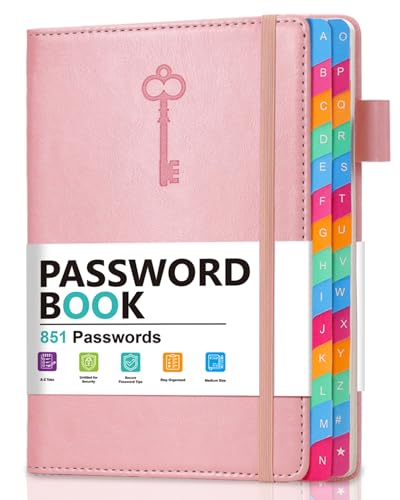
The hi!SCI Password Keeper Book is the high-capacity desk option in this guide. At 5.8 by 8.4 inches with 230 pages of 100gsm paper, the maker states it can store up to 1,097 passwords — roughly double the capacity of a typical pocket book — which makes it the natural choice for a household recording years of accounts in one volume, or for anyone who manages logins for family members as well as themselves. Colorful A-Z tabs with clear letter prints divide the sections, so even a nearly full book stays searchable.
Beyond the main login sections, the book provides room for internet service provider information, wireless router settings, software licenses, email settings, frequently visited websites, and additional notes — the supporting details that are usually scattered across emails and paperwork. Two ribbon bookmarks in different colors help you mark the sections you return to most, an elastic closure strap holds the book shut, an elastic pen holder keeps a pen with it, and a reinforced inner pocket stores loose slips. The cover carries a discreet key pattern with no visible title or label, so on a shelf it reads as an ordinary notebook rather than a book of passwords.
4. JXSELECT Elegant Password Book with Alphabetical Tabs, Turquoise
- View on Amazon: https://www.amazon.com/dp/B09H7C9G81
The JXSELECT Elegant Password Book sits between the pocket and desk formats at 5.2 by 7.6 inches, a medium size that gives each entry more room than a pocket book while still fitting a drawer or a tote bag. It is a hardcover book in faux leather with alphabetical A-Z tabs for finding a login in seconds, and the paper is a thick 120gsm stock chosen to resist ink bleed-through, which matters in a book you will write in for years with whatever pen is at hand.
The layout pairs the tabbed password sections with a notes section and an inner back pocket for bills, slips, or recovery codes you want kept with the book. The cover is anonymous, with no title on it, so the book does not advertise its contents. The front of the book also includes a short quick password guide covering the basics of choosing stronger passwords — longer combinations, mixed characters, and avoiding names and birthdays — which makes this a sensible first password book for someone organizing their logins properly for the first time. The same design is produced in other colors, including black and rose gold, for readers who want the book to match where it will be kept.
5. Panda Planner Password Book with Alphabetical Tabs and Locking Bag, Black
- View on Amazon: https://www.amazon.com/dp/B0CKTZRJ1V
The Panda Planner Password Book is the pick for readers who like the paper approach but want a physical barrier around the book itself. Alongside the medium-format logbook, the set includes a locking storage bag with a bonus lock, so the book can be kept closed away rather than simply shelved. For a household where a password book might otherwise sit in a shared drawer or on a shared desk, that extra step between another person and the pages is the whole point of this edition.
The book itself follows the proven organizer layout: alphabetical tabs for the website login entries, a fabric-print hardcover, and a ribbon bookmark for returning to a section quickly, with 5 by 7 inch sheets that leave comfortable writing room per entry. It is aimed squarely at adults organizing home internet accounts, and the black finish keeps it discreet. Choose this one if your main hesitation about a paper password manager has been who else could open it; choose one of the simpler books above if the book will live somewhere private already and the lock is one more thing to keep track of than you need.
Password Managers at a Glance
| Product | Type | Capacity or coverage | Size or term | Standout feature |
|---|---|---|---|---|
| NordPass Premium Digital Code | Software subscription | Unlimited devices | 1-year term, digital code | Autofill, breach scanner, password health checks |
| Clever Fox Password Book Pocket | Printed organizer book | Up to 399 passwords | 4 x 5.5 inches | Cutout A-Z tabs, lay-flat pocket format |
| hi!SCI Password Keeper Book | Printed organizer book | Up to 1,097 passwords | 5.8 x 8.4 inches, 230 pages | Highest capacity, sections for router and license details |
| JXSELECT Elegant Password Book | Printed organizer book | Tabbed A-Z sections with notes pages | 5.2 x 7.6 inches | Thick 120gsm no-bleed paper, anonymous cover |
| Panda Planner Password Book | Printed organizer book with storage bag | Tabbed A-Z sections | Medium format, 5 x 7 inch sheets | Locking bag and bonus lock included |
Frequently Asked Questions
Is a paper password book safer than a password manager app?
Neither is safer in every situation; they protect against different risks. A paper book cannot be reached by a remote attack, a leaked database, or a compromised cloud account, and it never needs a subscription. An app protects against the risks paper cannot — it works on every device, fills in logins for you, and can warn you about breaches and reused passwords. The practical answer for most people is a digital manager for daily use, with the most critical recovery details also written down and stored securely at home.
How is the NordPass subscription in this guide delivered?
It is sold on Amazon as a digital code rather than a boxed or card product. After purchase, the code is redeemed through a NordPass account to activate the Premium tier for the one-year term on unlimited devices. Because Amazon-bought subscriptions can differ in renewal terms from subscriptions bought directly from the provider, check the listing details for how renewal is handled before the first term ends.
What should I write in a password book: the password or a hint?
Writing the full password makes the book genuinely useful when you need to sign in, and it is the approach these organizers are laid out for, provided the book is stored somewhere private. A hint only works if it reliably brings the exact password back to mind months later, including capitals and symbols, which is harder than it sounds. Whichever you choose, be consistent, date entries when you change a password, and cross out old entries cleanly so there is never doubt about which one is current.
How many passwords can these books hold?
It depends on the format. The pocket Clever Fox book in this guide holds up to 399 entries, medium books hold several hundred across their tabbed sections, and the large hi!SCI keeper holds up to 1,097 according to its maker. Count your accounts before choosing: most people underestimate, because banking, email, shopping, utilities, streaming, work, and government accounts add up quickly, and each change of password still starts from the same entry space.
Disclosure: As an Amazon Associate, we earn from qualifying purchases.