Our Short List of 3
All 3 Picks at a Glance
| Product | Specs | Action |
|---|---|---|
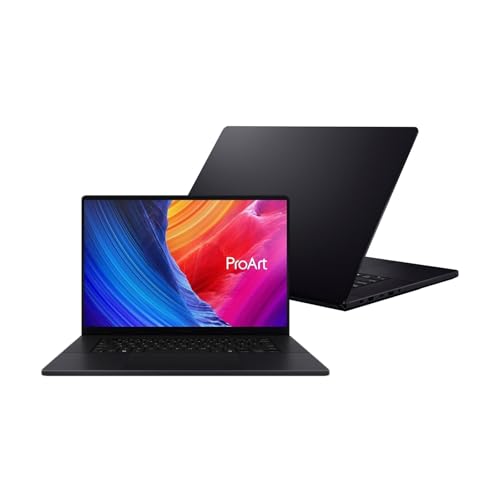 1. ASUS ProArt P16 (H7606WV) | Check price on Amazon | |
 2. HP Spectre x360 14 (14-eu002KCS) | Check price on Amazon | |
 3. ASUS ZenBook 14 OLED (Q415) | Check price on Amazon |
Key takeaways
- The best OLED creator laptops pair vivid, color-accurate OLED displays with strong processors. Compare three picks for photo, video, and design work.
Introduction
The best OLED creator laptops solve the problem that matters most to people who make images for a living or for serious hobby work: seeing color the way it will actually look when a photo is printed, a video is published, or a design is handed to a client. An OLED panel lights each pixel on its own, so black areas of an image stay truly black instead of glowing faintly gray, and bright highlights hold their detail against deep shadows. That contrast, paired with a wide color gamut, makes it easier to judge exposure, skin tones, and subtle gradients while editing.
A creator laptop is not simply a fast laptop with a nice screen. It needs a processor that can work through raw photo files and timeline renders, enough memory to keep large projects open without stuttering, fast storage for footage and libraries, and a display that can be trusted for color-critical decisions. The three laptops in this guide meet that brief in different ways: a full-size 4K OLED workstation, a convertible 2-in-1 with a high-resolution OLED touchscreen, and a light ultraportable with OLED color accuracy in a bag-friendly size.
Each pick below is a laptop with an OLED display sold on Amazon US, with its listing specifications laid out so you can compare them directly. The right choice depends on the work you do most: heavy video and 3D work calls for a dedicated graphics card and generous memory, while photo editing and design work on the move call for a lighter machine with a dependable panel and long battery life.
What to Look For in an OLED Creator Laptop
Display quality comes first
For creator work, the display is the tool you look at all day, so it deserves the most attention. Resolution decides how much detail you can see when zooming into a photo or checking focus on a video frame. A 4K panel shows the finest detail, a 3K panel is a strong middle ground, and a Full HD Plus panel is workable for general editing but shows less fine detail at full zoom.
Color gamut coverage is just as important as resolution. Look for a panel that covers the full DCI-P3 gamut, the wide color space used for digital cinema and much modern video work. Panels that also cover the sRGB and Adobe RGB spaces give you flexibility when a project moves between web, print, and video. Refresh rate matters less for stills but helps video editors who scrub timelines: a 120Hz panel renders movement more smoothly than a 60Hz panel.
Brightness and finish shape where you can work. A panel with a high HDR peak brightness holds up better in bright rooms, while a glossy OLED screen can pick up reflections near a window.
Processor, graphics, memory, and storage
The processor drives exports, renders, and batch edits. Modern multi-core mobile processors from Intel and AMD handle photo libraries and 4K timelines well, and a built-in neural processing unit helps with AI-assisted features in current editing software.
Graphics decide how smoothly video effects, 3D scenes, and GPU-accelerated filters run. Integrated graphics are enough for photo editing and light video work. A dedicated graphics card becomes valuable when you edit multi-layer 4K timelines, work with effects-heavy projects, or render 3D scenes, because it takes that load off the processor.
Memory is the workspace where open projects live. Eight gigabytes is a baseline for photo editing and everyday design work, while 16GB gives comfortable headroom for larger catalogs and video projects. Thirty-two gigabytes suits editors who keep several heavy applications open at once or work with very large files.
Storage should be a fast NVMe solid-state drive, since footage, raw files, and application libraries all benefit from quick reads and writes. A 512GB drive suits a focused photo workflow, while 1TB or 2TB gives room for video libraries without constant archiving to external drives.
Portability, ports, and battery
Creator laptops travel to shoots, studios, and client meetings, so weight and battery life matter. A machine near 2.8 pounds disappears into a camera bag, while a 16-inch workstation trades portability for screen space and power. Battery capacity, measured in watt-hours, is a useful guide: a 75 watt-hour battery generally supports a longer working day away from an outlet than a smaller one.
Ports decide how easily the laptop connects to the rest of a workflow. Thunderbolt 4 ports support fast external drives and high-resolution external monitors over a single cable, HDMI connects directly to TVs and projectors for client viewing, and a USB-A port keeps older card readers and peripherals useful without an adapter.
Best OLED Creator Laptops: The Roundup
1. ASUS ProArt P16 (H7606WV)
The ASUS ProArt P16 is the workstation of this roundup, built for creators who want the largest canvas and the most rendering muscle in a single machine. Its 16-inch 4K OLED touchscreen displays at 3840 x 2400 resolution with a 60Hz refresh rate and a 0.2ms response time, covering the full DCI-P3 gamut. That combination makes it a strong fit for video editors and retouchers who need to see fine detail and judge color on a generous screen, and the touch layer adds a direct way to scrub timelines or tap through adjustments.
The listed configuration pairs an AMD Ryzen AI 9 HX 370 processor with 12 cores running up to 5.1GHz, an NVIDIA GeForce RTX 4060 graphics card with 8GB of GDDR6 memory, 32GB of LPDDR5X memory, and a 1TB PCIe 4.0 NVMe solid-state drive. The dedicated graphics card is the key difference from the other two picks: it accelerates effects, 3D work, and timeline playback in video and motion projects, while the 32GB of memory keeps large projects and several applications open at once without slowing down.
The listing includes Windows 11 Home and a one-year ASUS USA warranty for parts and labor. The 16-inch size means this is a desk-first machine that can still travel when a project demands it.
Who it suits: video editors, motion designers, and photographers who work with large files and want a 4K OLED panel with a dedicated graphics card.
Considerations: the 16-inch frame is the least portable pick here, and the 60Hz refresh rate is standard for a 4K creator panel rather than the smoother 120Hz found on some smaller OLED laptops. Its memory is soldered on board, so choose the configuration with the memory you will need for the life of the machine.
2. HP Spectre x360 14 (14-eu002KCS)
HP Spectre x360 14 (14-eu002KCS)
The HP Spectre x360 14 is a convertible 2-in-1 that turns the creator laptop into a flexible tool: it works as a conventional laptop for editing and writing, then folds back for sketching, marking up proofs, or presenting work to a client on its touchscreen. Its 14-inch OLED touchscreen displays at 2880 x 1800 resolution, giving a sharp, high-density image that shows fine detail in photos and clean text in design layouts.
The listed configuration runs on a 16-core Intel Core Ultra 7 155H processor with Intel Arc graphics, 32GB of LPDDR5 memory, and a 2TB solid-state drive. The 2TB of storage is the largest in this roundup, which matters for photographers and videographers who keep extensive libraries on the machine itself rather than shuffling files to external drives. The 32GB of memory supports heavy multitasking, from a photo catalog to a browser full of references and a video call with a client.
Practical details in the listing include a backlit keyboard, a fingerprint reader, Thunderbolt 4, and Wi-Fi 6E. The backlit keyboard helps when editing in dim studios or on evening flights, the fingerprint reader speeds up secure sign-in, and Thunderbolt 4 supports fast external storage and external displays through a single cable.
Who it suits: photographers, illustrators, and designers who want a portable OLED laptop that doubles as a presentation and markup device, with generous storage for large libraries.
Considerations: integrated Intel Arc graphics handle photo editing and light video work well, but editors who regularly render effects-heavy 4K timelines or 3D scenes will get more headroom from a machine with a dedicated graphics card.
3. ASUS ZenBook 14 OLED (Q415)
The ASUS ZenBook 14 OLED Q415 is the portable pick in this roundup, bringing a color-accurate OLED panel to a machine that weighs 2.82 pounds and measures about half an inch thin. Its 14-inch Full HD Plus OLED touchscreen displays at 1920 x 1200 resolution in a 16:10 aspect ratio, with a 60Hz refresh rate, a 0.2ms response time, 500 nits of HDR peak brightness, and full DCI-P3 gamut coverage. The 16:10 shape gives extra vertical room for timelines and tool panels, which editors notice quickly after switching from a wider screen.
The listed configuration uses an Intel Core Ultra 5 125H processor with 14 cores running up to 4.5GHz, 8GB of soldered LPDDR5 memory, and a 512GB PCIe NVMe M.2 solid-state drive. An AI Boost neural processing unit is built into the processor to accelerate AI-assisted features in current software. The 75 watt-hour battery supports long sessions away from an outlet, with the listing describing up to 15 hours of battery life, and the all-metal chassis meets the MIL-STD 810H military-grade standard for durability.
Connectivity in the listing includes two Thunderbolt 4 ports, a USB 3.2 Gen 1 Type-A port, HDMI 2.1, a combo audio jack, Wi-Fi 6E, and Bluetooth 5.3. The machine also includes an FHD infrared webcam with a privacy shutter, a backlit keyboard, and Harman Kardon certified audio with Dolby Atmos support.
Who it suits: photographers, writers, and designers who travel light and want OLED color accuracy in a slim, durable ultraportable for photo work, writing, and everyday creative tasks.
Considerations: 8GB of memory is a baseline rather than a generous allowance, so editors who keep many large files open at once or who work with video should weigh the 32GB picks above. The Full HD Plus resolution shows less fine detail at full zoom than the 3K and 4K panels in this guide.
Comparison Table
| Laptop | Display | Processor | Graphics | Memory | Storage |
|---|---|---|---|---|---|
| ASUS ProArt P16 (H7606WV) | 16-inch 4K OLED touchscreen, 3840 x 2400, 60Hz | AMD Ryzen AI 9 HX 370, 12 cores up to 5.1GHz | NVIDIA GeForce RTX 4060, 8GB GDDR6 | 32GB LPDDR5X | 1TB PCIe 4.0 NVMe SSD |
| HP Spectre x360 14 (14-eu002KCS) | 14-inch OLED touchscreen, 2880 x 1800 | Intel Core Ultra 7 155H, 16 cores | Intel Arc Graphics | 32GB LPDDR5 | 2TB SSD |
| ASUS ZenBook 14 OLED (Q415) | 14-inch FHD Plus OLED touchscreen, 1920 x 1200, 60Hz | Intel Core Ultra 5 125H, 14 cores up to 4.5GHz | Integrated Intel Graphics | 8GB LPDDR5 | 512GB PCIe NVMe SSD |
Choosing for Your Use Case
The three picks map cleanly onto three kinds of creator workflow. Begin with the work you do most often, then let the display and the graphics card follow from that.
For video editing and motion work, the ProArt P16 is the natural match. Its 4K OLED panel shows the finest detail in footage, its dedicated RTX 4060 graphics card accelerates effects and playback, and its 32GB of memory handles multi-layer timelines. Editors who grade color will value the full DCI-P3 coverage, and the 16-inch screen gives timeline and image panels room to breathe.
For photography, illustration, and design, the Spectre x360 14 is a strong middle ground. Its 2880 x 1800 OLED touchscreen is sharp enough for detailed retouching, its 2TB of storage holds large photo libraries without constant archiving, and its convertible form lets you fold the machine back to present a portfolio or mark up an image directly on screen. Integrated Arc graphics are well matched to photo editing, batch exports, and light video work.
For travel, writing, and everyday creative work, the ZenBook 14 OLED Q415 is the easiest to carry. At 2.82 pounds with a 75 watt-hour battery and a durable all-metal chassis, it suits creators who edit on location, in cafes, or on flights. Its OLED panel still delivers the deep blacks and wide gamut that make OLED worth choosing, even if its resolution and memory are more modest than the other two picks.
Care and Use
A creator laptop earns its keep through daily use, and a few habits keep both the OLED panel and the machine in good shape. Keep brightness at a comfortable level rather than at maximum, and let the display sleep when you step away for a while. Vary what is on screen during long sessions instead of leaving the same static image open for hours at a time. These steps reduce the chance of faint image retention on an OLED panel.
Clean the screen with a soft, dry microfiber cloth, and use only a lightly dampened cloth for stubborn marks, wiping gently rather than pressing hard. Keep food and drink away from the keyboard, and keep the vents clear of dust so the cooling system can move air freely. A laptop sleeve protects the lid and screen in a bag, especially when the bag also holds a camera, lenses, or other hard objects.
For color-critical work, calibrate the display with a hardware colorimeter every few months, and keep the graphics drivers current so color profiles behave as expected. Back up photo and video libraries to a second drive or a cloud service, since a single drive holds work that cannot be recreated.
FAQ
What makes an OLED display better for creator work than a standard LCD panel?
An OLED panel lights each pixel individually, so black pixels can switch fully off. That produces true blacks and very high contrast, which helps when judging exposure, shadow detail, and color in photos and video. OLED panels also tend to cover wide color gamuts such as DCI-P3, which matters when work moves between screens, print, and video.
How much memory does a creator laptop need?
It depends on the work. Eight gigabytes suits photo editing, writing, and design work with a modest number of open files. Sixteen gigabytes gives comfortable headroom for larger catalogs and video projects. Thirty-two gigabytes suits editors who keep several heavy applications open at once, work with very large raw files, or edit multi-layer video.
Do I need a dedicated graphics card for photo editing?
For most photo editing, no. Integrated graphics handle raw processing, retouching, and batch exports well, and the Intel Arc graphics in the Spectre x360 14 are capable for that kind of work. A dedicated graphics card becomes valuable for 4K video editing with effects, 3D rendering, and motion graphics, where it takes heavy parallel work off the processor.
Can I use an OLED creator laptop in a bright room?
Yes, with some awareness of the surroundings. The ZenBook 14 OLED lists 500 nits of HDR peak brightness, which helps in bright rooms, and the higher-resolution panels in the ProArt P16 and Spectre x360 14 also hold up well indoors. Glossy OLED screens can reflect windows and lamps, so facing away from direct light and using a comfortable brightness level makes editing easier.
How do I keep an OLED screen looking its best over time?
Vary the content on screen, let the display sleep when you step away, and keep brightness at a comfortable level rather than at maximum. Avoid leaving the same static image on screen for very long stretches. Clean the panel gently with a microfiber cloth, and calibrate it with a hardware colorimeter for color-critical work. These habits keep the panel uniform and color-accurate for longer.
Conclusion
The best OLED creator laptops pair a trustworthy display with the hardware to match the work. The ASUS ProArt P16 brings a 4K OLED panel and a dedicated graphics card to video and motion workflows, the HP Spectre x360 14 pairs a sharp OLED touchscreen with generous storage and a flexible 2-in-1 design, and the ASUS ZenBook 14 OLED Q415 delivers OLED color accuracy in a light, durable ultraportable. Choose by the work you do most, check that the memory and storage fit your libraries, and look after the panel so it keeps showing your work the way you intended it to look.
Disclosure: As an Amazon Associate, we earn from qualifying purchases.