Our Short List of 3
All 5 Picks at a Glance
| Product | Specs | Action |
|---|---|---|
 1. Cooler Master NR200 — Mini-ITX | Check price on Amazon | |
 2. Fractal Design Terra Silver — Mini-ITX | Check price on Amazon | |
 3. ASUS Prime AP201 — Micro-ATX | Check price on Amazon | |
 4. Thermaltake Versa H17 — Micro-ATX | Check price on Amazon | |
 5. Cooler Master MasterBox Q300L — Micro-ATX | Check price on Amazon |
Key takeaways
- The best Mini ITX and Micro ATX PC cases balance a small footprint with real GPU and cooling room. Compare five verified cases by form factor and clearance.
As an Amazon Associate we earn from qualifying purchases.
A small PC case is easy to buy badly. Shrink the box too far and the graphics card does not fit, the cooler has nowhere to breathe, or the power supply turns out to need a special small-format unit that was never budgeted for. Stay too large and the whole point of a compact build disappears. This guide to the best mini itx and mirco atx pc cases works through that trade-off honestly, covering both Mini-ITX and Micro-ATX form factors, stating the form factor of every pick in plain language, and using only clearances and specifications taken from manufacturer and retail listings.
Affiliate disclosure: This article contains affiliate links. If you buy through a link on this page, we may earn a commission at no additional cost to you.
Mini-ITX and Micro-ATX, Explained Before the Picks
The two form factors in this guide differ in one fundamental way: the size of motherboard they accept, and everything else follows from that.
Mini-ITX boards measure 170 by 170 mm. They carry a single expansion slot, usually two memory slots, and they demand the most planning from a builder because the case around them is designed tightly to that small board. Mini-ITX cases are the smallest in this guide, with volumes in the picks below ranging from just over ten litres to a little over eighteen litres. Most require a small-form-factor SFX power supply rather than a standard ATX unit, and several route the graphics card behind the motherboard on a riser cable to save space.
Micro-ATX boards measure up to 244 by 244 mm. They typically offer four expansion slots and often four memory slots, and the cases built for them are larger, roomier, and more forgiving. Micro-ATX cases in this guide sit around the thirty-litre mark and above, accept standard ATX power supplies, and give a first-time builder more room for hands, cables, and mistakes. Many Micro-ATX cases also accept a Mini-ITX board, since the smaller board fits the same mounting area, and where a pick below does that, the listing says so and this guide notes it.
Neither form factor is better in the abstract. Mini-ITX is the choice when desk space, portability, or a living-room footprint is the priority and the build is planned around one graphics card. Micro-ATX is the choice when expansion room, easier assembly, standard power supplies, and lower overall fuss matter more than the last few litres. Reading the picks with that split in mind makes the right answer for a given build fairly obvious.
How the Picks Were Chosen
Every case below meets four tests. It is a PC case whose listing states support for Mini-ITX, Micro-ATX, or both, and no other form factor is represented in the pick list. Its key clearances come from its manufacturer or retail listing: graphics card length, radiator support, cooler height, and power supply type, quoted as listed rather than estimated. It comes from an established case brand with a verifiable retail listing. And it represents a distinct point in the range, so the five picks are a genuine choice between a tiny desk case, an airflow-focused small tower, and the roomier Micro-ATX options, rather than five versions of the same box.
One warning applies to the whole category. Small cases punish assumptions. A graphics card that fits by length may still fail by thickness or height, a radiator that fits by size may collide with memory or cables, and a power supply that fits by type may still be too long. The figures below are the starting point for a build plan, and the final check is always the specific parts list measured against the specific case manual.
The 5 Best Mini ITX and Micro ATX PC Cases
1. Cooler Master NR200 — Mini-ITX
Form factor: Mini-ITX only. The NR200 is the roomiest Mini-ITX pick in this guide at 18.25 litres, and that extra volume is exactly why it suits builders who want small without going extreme. Cooler Master lists graphics card support up to 330 mm with a horizontal triple-slot mount, radiator support up to 280 mm on the side bracket, and room for up to six 120 mm fans. The listing states a CPU cooler and power supply picture that needs attention: the case takes SFX power supplies only, up to 130 mm in length, and no standard ATX unit fits. Vented steel panels cover the sides, and the internal layout leaves space for both 3.5-inch and 2.5-inch storage, which is unusual generosity at this size. For a Mini-ITX build that still wants a large graphics card and a real choice between air and liquid cooling, the NR200 is the balanced starting point, provided the SFX power supply is planned from the beginning rather than discovered at the end.
View it on Amazon: https://www.amazon.com/dp/B08BFJHP26
2. Fractal Design Terra Silver — Mini-ITX
Form factor: Mini-ITX only. The Terra is the design-led pick, at 10.4 litres the joint-smallest case in this guide, built from anodized aluminium panels with a front panel cut from solid walnut. Fractal Design lists graphics card support up to 322 mm, an included PCIe 4.0 riser cable, and a stepless slidable central wall that shifts the internal dividing spine to trade space between the graphics card side and the CPU side, which is the mechanism that makes a case this small workable with different card thicknesses. Front connectivity includes a USB Type-C port. Cooling is the honest compromise: a case at this volume is an air-cooling and low-profile-cooler proposition, with limited fan mounting compared with the NR200 above, and it also requires a small-form-factor power supply. Choose the Terra when the PC will live visibly in a room and its appearance matters alongside its footprint, and when the parts list is deliberately chosen to suit a ten-litre home.
View it on Amazon: https://www.amazon.com/dp/B09DKPY3TX
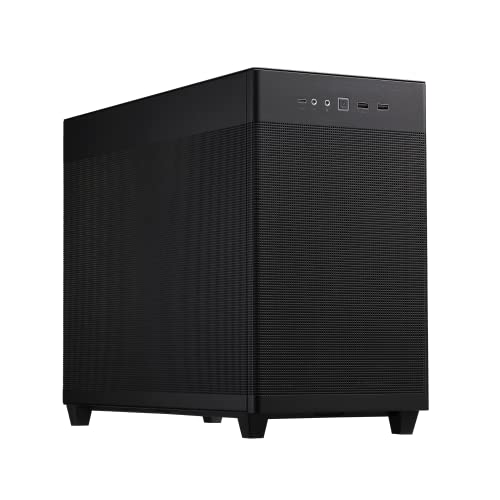
3. ASUS Prime AP201 — Micro-ATX
Form factor: Micro-ATX, with Mini-ITX also supported in the listing specifications. The AP201 is the airflow-first Micro-ATX pick. ASUS describes a 33-litre case wrapped in quasi-filter mesh panels made of more than 57,000 precision-machined holes, which is the entire thermal strategy: the case breathes through its panels instead of relying on a single intake path. The listing supports radiators up to 360 mm, up to six fans, graphics cards up to 338 mm long, and standard ATX power supplies up to 180 mm long, which removes the small-format power supply requirement that the Mini-ITX picks impose. Side panels remove with a tool-free clip mechanism, and an extended motherboard tray leaves a 32 mm gap for cable routing. At 33 litres it is not a tiny case, and it should not be bought as one. It is the pick for a Micro-ATX build with a hot-running graphics card where thermals and an easy build experience outrank absolute size.
View it on Amazon: https://www.amazon.com/dp/B0B99HTD3B
4. Thermaltake Versa H17 — Micro-ATX
Form factor: Micro-ATX, with Mini-ITX also listed as compatible. The Versa H17 is the straightforward budget mini tower in this guide, built from SPCC steel with a plain, brushed-look front panel and a single 120 mm rear fan pre-installed. Thermaltake lists graphics card clearance up to 350 mm without a front fan fitted, CPU cooler height up to 155 mm, and power supply length up to 220 mm with a bottom-mount position for a standard unit. Radiator support runs to 280 mm at the front and 120 mm at the rear, and the hidden drive bays hold a mix of 2.5-inch and 3.5-inch storage. Front ports cover USB 3.0, USB 2.0, and HD audio. Nothing here is exotic, and that is the point: standard parts fit in standard places, cable routing is designed in, and the four expansion slots match the Micro-ATX boards it is built for. For an entry-level or office-adjacent Micro-ATX build that will not be opened often, the H17 covers the fundamentals without demanding special components.
View it on Amazon: https://www.amazon.com/dp/B0797GHT9F
5. Cooler Master MasterBox Q300L — Micro-ATX
Form factor: Micro-ATX. The Q300L takes a different approach to the budget Micro-ATX brief. Its panels are perforated for airflow and covered by magnetic dust filters that use a patterned design, so cleaning the intake path means lifting a filter off rather than dismantling the case. A transparent acrylic side panel shows the build, and the front input and output panel is adjustable, able to be repositioned on the case, which helps when the tower sits on the floor on either side of a desk. Cooler Master lists one 120 mm fan pre-installed at the rear and a fully ventilated layout intended to move air through the perforations on multiple faces. Like the other Micro-ATX picks, it works with standard power supplies and the four-slot layout of a Micro-ATX board. It suits a builder who wants a compact tower that is easy to keep clean and flexible about placement, and who prefers a windowed side panel to the plain steel of the Versa H17.
View it on Amazon: https://www.amazon.com/dp/B0785GRMPG
Side-by-Side Comparison
| Case | Form factor | Volume | Listed GPU clearance | Radiator support | Power supply |
|---|---|---|---|---|---|
| Cooler Master NR200 | Mini-ITX | 18.25 L | Up to 330 mm | Up to 280 mm | SFX only, up to 130 mm |
| Fractal Design Terra Silver | Mini-ITX | 10.4 L | Up to 322 mm | Air-focused, limited mounting | Small-form-factor |
| ASUS Prime AP201 | Micro-ATX, Mini-ITX | 33 L | Up to 338 mm | Up to 360 mm | ATX, up to 180 mm |
| Thermaltake Versa H17 | Micro-ATX, Mini-ITX | Mini tower | Up to 350 mm without front fan | Up to 280 mm front | Standard, bottom mount |
| Cooler Master MasterBox Q300L | Micro-ATX | Compact tower | See listing for fitted configuration | Ventilated air layout | Standard |
Read the table by form factor first. The two Mini-ITX cases are the only picks under twenty litres, and both ask for a small-form-factor power supply and a one-graphics-card plan. The three Micro-ATX cases trade litres for standard power supplies, more expansion slots, and an easier build. Within each group, the separation is cooling style: mesh and radiator room in the AP201, plain fundamentals in the Versa H17, filtered perforation in the Q300L, and sheer graphics card room in the NR200 against the Terra and its furniture-grade finish.
Planning a Small Build Without Regrets
Start with the graphics card, not the case. Measure the card’s length, thickness in slots, and height, then match all three against the case listing and manual. Length alone is the figure most often quoted and the one most often responsible for a card that almost fits.
Budget the power supply the case demands. Mini-ITX picks here need SFX or similar small units, which are a separate purchase decision from a standard ATX supply. The Micro-ATX picks accept standard units, one reason their total build cost and parts availability are simpler.
Decide the cooling route before ordering. A case that supports a 240 mm or larger radiator still needs the tubes, fans, and memory clearance to agree in the same space. Air-cooled small builds need the listed cooler height checked against the chosen cooler, including any fan mounted above it.
Plan cables as a component. In a ten to eighteen litre case there is no spare void for excess cable length. Modular power supplies, shorter cable runs, and routing the cables before the final components go in are the difference between a tidy small build and a frustrating one.
Leave the second build in mind. A Micro-ATX case that also accepts Mini-ITX, or a Mini-ITX case with room for several drives, gives the chassis a second life when the next motherboard arrives. Cases outlast the parts inside them more often than any other component.
What to Avoid
Avoid buying a Mini-ITX case for a Micro-ATX board, or the reverse assumption that a Micro-ATX board fits anywhere small: the board size is a hard physical limit, not a guideline. Avoid treating a headline radiator size as a promise that a specific radiator, with its specific fans and fittings, clears the memory and graphics card in that specific layout. Avoid ignoring power supply format until checkout, because an ATX unit will not fit an SFX-only case at any level of determination. Avoid sealed-front small cases for hot components unless the listing shows a credible alternative intake path. Finally, avoid judging this category on volume alone: an eleven-litre case with a slidable spine and a good riser can be a better home for a given card than a sixteen-litre case with a fixed, awkward interior.
Verdict
The split in this guide is the decision itself. For Mini-ITX, the Cooler Master NR200 is the flexible pick, with 330 mm of graphics card room and up to 280 mm of radiator support in 18.25 litres, while the Fractal Design Terra is the compact, design-led pick at 10.4 litres for a deliberately planned build. For Micro-ATX, the ASUS Prime AP201 leads on mesh airflow and 360 mm radiator support, the Thermaltake Versa H17 covers the budget fundamentals with standard parts throughout, and the Cooler Master MasterBox Q300L adds magnetic filtration and a repositionable front panel. That is the honest shape of the best mini itx and mirco atx pc cases: pick the form factor that matches the board and the room, then pick the case whose clearances match the parts already chosen.